> For the complete documentation index, see [llms.txt](https://docs.editran.onesait.com/llms.txt). Markdown versions of documentation pages are available by appending `.md` to page URLs; this page is available as [Markdown](https://docs.editran.onesait.com/documentacion-editran/open-v5.2.1-en/windows/interfaz_generica.md).
# Editran/G management
## Onesait Editran/G Management
The product installation creates the editran programs folder in the Windows Start menu. Click the option "*Menu G"* which will display the editran/G manager window.

If this is the first time editran/G is started, the first thing you must do is enter the local environment data (see chapter **3.6** Onesait Editran /G Administrator).
### Operation interface
In the screens included in this document, the different types of fields are represented as follows:
#### Screens
Three areas can be distinguished on the editran WINDOWS screens:
* **(1) Menus**
> In the menu area, you choose the different options for managing editran.
>
> Starting and stopping editran, reports, system administration.
>
> They are activated by the cursor, by underlined letters.
>
>  * **(2) Toolbar**
> Different icons appear in the area, indicating actions equivalent to those in the menus; when you hover over each icon, information associated with that icon's action appears at the bottom of the screen.
>
>
* **(2) Toolbar**
> Different icons appear in the area, indicating actions equivalent to those in the menus; when you hover over each icon, information associated with that icon's action appears at the bottom of the screen.
>
>  * **(3) Information**
> In this area, the information that editran sends to the operator appears:
* Presentation.
* Emission and reception states.
* Information text or messages from the remote operator.

* **(4) HELP**

> editran/G has a help system. Thus, when you press the F1 key, a window with the help text appears.
### Starting and stopping Onesait Editran
To start and stop editran, select the File option from the General Menu and then choose the option *Start editran* or *Stop editran.*

The following toolbar icon is equivalent to starting and stopping editran through the menu:

Placing the cursor and pressing on the traffic light performs the start action in editran/G and editran/P, leaving the traffic light green.

> Placing the cursor and pressing on the green traffic light symbol performs the stop action of editran/G and editran/P, leaving the traffic light red:

### Onesait Editran /G Operator
To operate on presentations, select the option in the main menu **Editran/G > Operator**. Keep in mind that if we want to act on a specific presentation, we must click the cursor on it and select it (the white background will turn blue). If none is selected, a window will appear asking you to choose the presentation to use:

The following options will be presented:

You can also right-click to display a context menu with the same options.
#### Load emission presentation.
* This option is only allowed when the Presentation has no activity (state represented by ...) or when it is *LOADED* and the profile is configured to allow cumulative loading. In any other case, the following message will be shown to the user *"Presentation state incompatible with the request"*.
* If the request is accepted, the presentation moves to the temporary state *LOADING* in which the following steps are performed:
* The pre-emission user program is executed, if it exists in the profile.
* The converter program corresponding to the remote entity's version is executed. This program creates the buffer files that package the data to be transmitted.
* If the loading process finishes correctly, the final state will be *LOADED*. If an error occurs, the corresponding message will be displayed and it will remain in the initial state. The image shows an example of a presentation load request for which there are no files to transmit.

This button is equivalent to the action through menus:

#### Emit presentation.
This operation is accepted when the presentation emission state is: inactive (*...*), *LOADED* or *INTERRUPTED*). In general, it is the only request made to emit since, if necessary, the loading process discussed in the previous point is carried out first.
Once *LOADED* A1R messages are sent to editran/P for as many transmission sessions as the presentation uses. The same is done if it were *INTERRUPTED* except that in this case, transmission will resume from the point where it stopped.
The emission state changes to *TRANSMITTING* and waits to receive the editran/P notification of the end of the transmission(s).
In the image, a typical sequence of log messages associated with an emission request for a presentation with a single transmission session.

Pressing this button is equivalent to the action through menus:

#### Interrupt emission.
Option that allows the editran operator to stop the current emission (state *TRANSMITTING*). For this, each transmission session of the presentation is notified to be interrupted via the EDP message. The presentation state temporarily changes to *INTERRUPTED* but it can be resumed by requesting the emission again.
Pressing this button is equivalent to the action through menus:

#### Initialize emission presentation
Each time the transmission of a presentation ends successfully, it returns to the initial state. If for some reason an emission is interrupted and you want to cancel it to start another one from scratch, you must select this option to initialize the presentation. The only time initialization is not allowed is when the presentation is in state *TRANSMITTING*, in that case it is necessary to interrupt it first.
This button is equivalent to the action from the menu:

#### Receive presentation
Each presentation in editran can be configured to accept the remote entity connecting and sending (server mode), or to allow transmission requests only from the local entity, both to emit and receive (client mode).
Whenever you want to start a connection with the remote editran to retrieve the files it has available for the presentation, this option is chosen. Depending on the state of that presentation, the response will be different.
If the presentation is inactive (*...*), that is, a new reception is starting, the user program configured as pre-reception is launched, and the A2R message is sent to each transmission session. The presentation state changes to *TRANSMITTING* until receiving the editran/P notification of the end of the transmission(s) (A4P). In state *INTERRUPTED* the behavior is the same, except that the pre-user program is not launched since the transmission resumes from where it left off, avoiding retransmitting the already exchanged volume.
In any other state, the following message will be shown to the user *"Presentation state incompatible with the request"* since a presentation can have only one transmission in progress. A special case is the state *TRANSMITTED* in which the buffers have been received, but the download has not finished.
This button is equivalent to the action from the menu.

#### Download reception.
In the reception process, the download or transformation of the received buffer files is performed automatically. This means this option only has to be used exceptionally when, due to some failure, the presentation state ends up in *TRANSMITTED*. In these cases, the product log information must be analyzed to see whether it is a local error that can be corrected and try the download again.
In the INTERRUPTED state this option is also allowed, but in this case there is an additional check that the total data really has been transmitted.
The presentation state that will be seen in the user interface during the download process is *DOWNLOADING*. And when finished, it will be ready to start a new reception (...).
Only when the download process finishes successfully is the user program after reception executed. If it fails, the exception user program will be launched, indicating the error code. If the user wants actions to be performed in those cases, they must be set in the presentation profile, since by default these fields are left blank in this version.
Pressing this button is equivalent to the action through menus:

#### Initialize reception presentation.
As explained for emissions, each time the transmission of a presentation ends successfully, it returns to the initial state ready to perform the next one. Only if for some reason a reception *INTERRUPTED* or *TRANSMITTED* is to be canceled, it must be reset using this option.
The initialization process removes all control information from the current transmission so that the next one starts from scratch.
This option is equivalent to the action from the menus:

#### Interrupt reception.
The editran operator can interrupt any reception in progress (state *TRANSMITTING*). For this, each transmission session of the presentation is notified to disconnect via the EDR message. The presentation state temporarily changes to *INTERRUPTED* but it can be resumed by requesting the reception again.
If the presentation has exception user process configured, it is executed and the error code received is 110 (see section **4.4.2.1**).
Pressing this button is equivalent to the action through menus:

### Sending operations using integrated Editran/FF
#### Editran/G configuration to connect to the Editran/FF server
Before sending signed files, the Editran environment must be configured to communicate with the available Editran/FF server. For this, it is necessary to have started Editran/G as administrator.
The parameters related to Editran/FF can be accessed from the Help -> About Editran option or directly by clicking on the  button in the Editran/G toolbar and clicking the Distributed option.

In the window that appears, the Editran/FF section must be configured with the IP address plus the listening port of the machine where the Editran/FF server is installed (the default port is 8300).
If the FF server is installed on the same machine where Editran was installed, the IP address will be 127.0.0.1:8300
It is also necessary to specify the sending directory configured at the general level on the Editran/FF server, in which Editran will look for the signed files ready to be sent.
To apply the configuration, you must click the Update button and then the OK button to close the dialog.

#### Sending signed files with Editran/FF
A presentation in Editran/G must be configured so that it takes as data source the Editran/FF applications that have files available for sending.
To do this, you have to create a new presentation in Editran/G or edit an existing one and check the option *Send the signed files in Editran/FF* in the tab *Files.*

In the dialog, the button *New FF Application* will be enabled and if communication with the FF server is correct, the ApplicationsFF selection window will appear, similar to the file selection dialog to be emitted. If communication has not been possible, an error message will appear notifying the problem.
In the file dropdown, you will be able to choose from all the Editran/FF applications that have been configured for sending with Editran.

As many applications as desired can be chosen to be sent through the same Editran/G presentation.
The Save button must be pressed to apply the presentation configuration before emitting the files.

### File inquiry

#### Presentation status query.
To query a particular presentation, select the presentation and then choose the type of sending (emission or reception). In the information area of the window (bottom part), the information summarizing the status of the presentation and its transmission sessions will appear.

* **PRESENTATION STATUS**
It can have the following values:
| | |
| ------------ | -------------------------------------------------------------------------------------------------------------------------------------------------------------------------------------------- |
| **...** | The presentation is ready to start a new emission/reception. There is no transmission in progress. |
| LOADED | The presentation buffer files have been generated but sending to the remote entity has not started. |
| TRANSMITTING | One of the presentation's transmission sessions is connected and transmitting. |
| TRANSMITTED | Transmission has finished. In emission, this state indicates that the remote download confirmation is still pending. In reception, it remains in this state when the download process fails. |
| INTERRUPTED | One of the presentation's transmission sessions is interrupted. |
***
* **PRESENTATION NO.**
In presentations configured to increment the presentation number, a counter is kept of the transmissions performed that must match on both ends. This is the value shown in this field. When the presentation is not using this feature, the field appears blank as in the example.
* **CHANGE DATE**
UTC date and time of the last change in presentation state.
* **SESSIONS**
There are as many lines as transmission sessions used in the presentation, up to a maximum of 20. Each line shows: session, date and time of buffer file creation and the information transmission ratio with the relationship between total and acknowledged records.
#### Modification of presentation states
Under normal circumstances, the way to initialize the state of a presentation, canceling the pending transmission and leaving it ready to start a new one, is from **Editran/G > Operator > Initialize presentation**.
There are some exceptional cases that may require a special modification of the presentation state. For example, when, after activating the option*Increment presentation number*" the two ends are not synchronized and it is necessary to indicate the correct number to continue with the transmissions.

When selecting **Editran/G > File inquiry > Presentation status modification > Emission or Reception**, the confirmation screen appears warning that this operation affects both sender and receiver and both ends must agree. The presentation session number is shown, which can be modified, and you are asked whether you want to initialize the presentation states. When pressing **OK** the state will be reset and the presentation will remain in the initial state.

#### Log query.
It is accessed from the main menu by selecting the option **Editran/G > File inquiry > Log query**. The log query window consists of a search filter and the list of results obtained. The filtering criteria are:
* *Presentation*. Wildcards are not allowed; you select a specific presentation or all (***\***).
* *Date and time*. The messages are shown from the defined date and time up to the current date of the query.
Once the filter is set, press the "OK Selection" button to apply it.

### Onesait Editran /G Administrator
The Editran/G administrator is accessed by selecting the Administrator option from the main menu, presenting the following screen:

#### Presentation profile.
In order to perform a transmission with editran, it is necessary to have previously defined what is called the presentation profile. It establishes all the parameters governing a type of information exchange organized by: presentation data, remote entity data, application data, and file data.
When choosing the Presentation profile option, a window will appear with the tabs explained below. Press the **Save** button to apply the changes made.
* **PRESENTATION TAB:**

* **Presentation**
Choose the name of the Presentation you want to add or modify.
* **Local Code**
Values taken from the local environment. It can only be modified if the installation is licensed to work with multiple local codes.
* **Presentation data**
* **Increment presentation number (Yes/No)**
Specifies whether the presentation number and therefore the exchange session number of each of the editran sessions associated with it should be incremented or not in the pre-emission and reception processes.
* **Number of presentation sessions**
Number of transmission sessions associated with the presentation. These sessions must have been previously registered with the editran/P administrator. In the "Editran/P Applications" table, it must be specified which ones they are.
* **Division criterion**
> Only applies when several transmission sessions are used for the presentation. The following values can be specified:
>
> **None:** No split is performed.
>
> **By volume:** The emission application information would be evenly distributed among the different buffers, with a minimum of 400,000 octets per buffer. This means that some of the transmission sessions defined in the presentation might not be used.
>
> **By file**: File-based distribution. Successive complete files would be assigned to each emission buffer.
* **Load type**
> With cumulative load type, the buffer can be reloaded with new application files, as long as transmission has not started. Cumulative loading requires the use of a single transmission session.
>
> **Normal:** A single load per emission.
>
> **Cumulative:** Allows loading several times before emitting.
* **Request download confirmation**
> With remote download confirmation, the emission will not be considered complete until the result of its download is received from the remote side. When the download ends with an error, the exception user process will receive the value indicating it in the result parameter.
* **Editran/P Applications**
Names of the Editran/P applications corresponding to the transmission sessions of the presentation. The table enables as many elements as indicated by the number of sessions field and in each one it allows choosing from the list showing those configured in editran/P for the same local and remote code.
* **REMOTE ENTITY TAB:**
>
* **(3) Information**
> In this area, the information that editran sends to the operator appears:
* Presentation.
* Emission and reception states.
* Information text or messages from the remote operator.

* **(4) HELP**

> editran/G has a help system. Thus, when you press the F1 key, a window with the help text appears.
### Starting and stopping Onesait Editran
To start and stop editran, select the File option from the General Menu and then choose the option *Start editran* or *Stop editran.*

The following toolbar icon is equivalent to starting and stopping editran through the menu:

Placing the cursor and pressing on the traffic light performs the start action in editran/G and editran/P, leaving the traffic light green.

> Placing the cursor and pressing on the green traffic light symbol performs the stop action of editran/G and editran/P, leaving the traffic light red:

### Onesait Editran /G Operator
To operate on presentations, select the option in the main menu **Editran/G > Operator**. Keep in mind that if we want to act on a specific presentation, we must click the cursor on it and select it (the white background will turn blue). If none is selected, a window will appear asking you to choose the presentation to use:

The following options will be presented:

You can also right-click to display a context menu with the same options.
#### Load emission presentation.
* This option is only allowed when the Presentation has no activity (state represented by ...) or when it is *LOADED* and the profile is configured to allow cumulative loading. In any other case, the following message will be shown to the user *"Presentation state incompatible with the request"*.
* If the request is accepted, the presentation moves to the temporary state *LOADING* in which the following steps are performed:
* The pre-emission user program is executed, if it exists in the profile.
* The converter program corresponding to the remote entity's version is executed. This program creates the buffer files that package the data to be transmitted.
* If the loading process finishes correctly, the final state will be *LOADED*. If an error occurs, the corresponding message will be displayed and it will remain in the initial state. The image shows an example of a presentation load request for which there are no files to transmit.

This button is equivalent to the action through menus:

#### Emit presentation.
This operation is accepted when the presentation emission state is: inactive (*...*), *LOADED* or *INTERRUPTED*). In general, it is the only request made to emit since, if necessary, the loading process discussed in the previous point is carried out first.
Once *LOADED* A1R messages are sent to editran/P for as many transmission sessions as the presentation uses. The same is done if it were *INTERRUPTED* except that in this case, transmission will resume from the point where it stopped.
The emission state changes to *TRANSMITTING* and waits to receive the editran/P notification of the end of the transmission(s).
In the image, a typical sequence of log messages associated with an emission request for a presentation with a single transmission session.

Pressing this button is equivalent to the action through menus:

#### Interrupt emission.
Option that allows the editran operator to stop the current emission (state *TRANSMITTING*). For this, each transmission session of the presentation is notified to be interrupted via the EDP message. The presentation state temporarily changes to *INTERRUPTED* but it can be resumed by requesting the emission again.
Pressing this button is equivalent to the action through menus:

#### Initialize emission presentation
Each time the transmission of a presentation ends successfully, it returns to the initial state. If for some reason an emission is interrupted and you want to cancel it to start another one from scratch, you must select this option to initialize the presentation. The only time initialization is not allowed is when the presentation is in state *TRANSMITTING*, in that case it is necessary to interrupt it first.
This button is equivalent to the action from the menu:

#### Receive presentation
Each presentation in editran can be configured to accept the remote entity connecting and sending (server mode), or to allow transmission requests only from the local entity, both to emit and receive (client mode).
Whenever you want to start a connection with the remote editran to retrieve the files it has available for the presentation, this option is chosen. Depending on the state of that presentation, the response will be different.
If the presentation is inactive (*...*), that is, a new reception is starting, the user program configured as pre-reception is launched, and the A2R message is sent to each transmission session. The presentation state changes to *TRANSMITTING* until receiving the editran/P notification of the end of the transmission(s) (A4P). In state *INTERRUPTED* the behavior is the same, except that the pre-user program is not launched since the transmission resumes from where it left off, avoiding retransmitting the already exchanged volume.
In any other state, the following message will be shown to the user *"Presentation state incompatible with the request"* since a presentation can have only one transmission in progress. A special case is the state *TRANSMITTED* in which the buffers have been received, but the download has not finished.
This button is equivalent to the action from the menu.

#### Download reception.
In the reception process, the download or transformation of the received buffer files is performed automatically. This means this option only has to be used exceptionally when, due to some failure, the presentation state ends up in *TRANSMITTED*. In these cases, the product log information must be analyzed to see whether it is a local error that can be corrected and try the download again.
In the INTERRUPTED state this option is also allowed, but in this case there is an additional check that the total data really has been transmitted.
The presentation state that will be seen in the user interface during the download process is *DOWNLOADING*. And when finished, it will be ready to start a new reception (...).
Only when the download process finishes successfully is the user program after reception executed. If it fails, the exception user program will be launched, indicating the error code. If the user wants actions to be performed in those cases, they must be set in the presentation profile, since by default these fields are left blank in this version.
Pressing this button is equivalent to the action through menus:

#### Initialize reception presentation.
As explained for emissions, each time the transmission of a presentation ends successfully, it returns to the initial state ready to perform the next one. Only if for some reason a reception *INTERRUPTED* or *TRANSMITTED* is to be canceled, it must be reset using this option.
The initialization process removes all control information from the current transmission so that the next one starts from scratch.
This option is equivalent to the action from the menus:

#### Interrupt reception.
The editran operator can interrupt any reception in progress (state *TRANSMITTING*). For this, each transmission session of the presentation is notified to disconnect via the EDR message. The presentation state temporarily changes to *INTERRUPTED* but it can be resumed by requesting the reception again.
If the presentation has exception user process configured, it is executed and the error code received is 110 (see section **4.4.2.1**).
Pressing this button is equivalent to the action through menus:

### Sending operations using integrated Editran/FF
#### Editran/G configuration to connect to the Editran/FF server
Before sending signed files, the Editran environment must be configured to communicate with the available Editran/FF server. For this, it is necessary to have started Editran/G as administrator.
The parameters related to Editran/FF can be accessed from the Help -> About Editran option or directly by clicking on the  button in the Editran/G toolbar and clicking the Distributed option.

In the window that appears, the Editran/FF section must be configured with the IP address plus the listening port of the machine where the Editran/FF server is installed (the default port is 8300).
If the FF server is installed on the same machine where Editran was installed, the IP address will be 127.0.0.1:8300
It is also necessary to specify the sending directory configured at the general level on the Editran/FF server, in which Editran will look for the signed files ready to be sent.
To apply the configuration, you must click the Update button and then the OK button to close the dialog.

#### Sending signed files with Editran/FF
A presentation in Editran/G must be configured so that it takes as data source the Editran/FF applications that have files available for sending.
To do this, you have to create a new presentation in Editran/G or edit an existing one and check the option *Send the signed files in Editran/FF* in the tab *Files.*

In the dialog, the button *New FF Application* will be enabled and if communication with the FF server is correct, the ApplicationsFF selection window will appear, similar to the file selection dialog to be emitted. If communication has not been possible, an error message will appear notifying the problem.
In the file dropdown, you will be able to choose from all the Editran/FF applications that have been configured for sending with Editran.

As many applications as desired can be chosen to be sent through the same Editran/G presentation.
The Save button must be pressed to apply the presentation configuration before emitting the files.

### File inquiry

#### Presentation status query.
To query a particular presentation, select the presentation and then choose the type of sending (emission or reception). In the information area of the window (bottom part), the information summarizing the status of the presentation and its transmission sessions will appear.

* **PRESENTATION STATUS**
It can have the following values:
| | |
| ------------ | -------------------------------------------------------------------------------------------------------------------------------------------------------------------------------------------- |
| **...** | The presentation is ready to start a new emission/reception. There is no transmission in progress. |
| LOADED | The presentation buffer files have been generated but sending to the remote entity has not started. |
| TRANSMITTING | One of the presentation's transmission sessions is connected and transmitting. |
| TRANSMITTED | Transmission has finished. In emission, this state indicates that the remote download confirmation is still pending. In reception, it remains in this state when the download process fails. |
| INTERRUPTED | One of the presentation's transmission sessions is interrupted. |
***
* **PRESENTATION NO.**
In presentations configured to increment the presentation number, a counter is kept of the transmissions performed that must match on both ends. This is the value shown in this field. When the presentation is not using this feature, the field appears blank as in the example.
* **CHANGE DATE**
UTC date and time of the last change in presentation state.
* **SESSIONS**
There are as many lines as transmission sessions used in the presentation, up to a maximum of 20. Each line shows: session, date and time of buffer file creation and the information transmission ratio with the relationship between total and acknowledged records.
#### Modification of presentation states
Under normal circumstances, the way to initialize the state of a presentation, canceling the pending transmission and leaving it ready to start a new one, is from **Editran/G > Operator > Initialize presentation**.
There are some exceptional cases that may require a special modification of the presentation state. For example, when, after activating the option*Increment presentation number*" the two ends are not synchronized and it is necessary to indicate the correct number to continue with the transmissions.

When selecting **Editran/G > File inquiry > Presentation status modification > Emission or Reception**, the confirmation screen appears warning that this operation affects both sender and receiver and both ends must agree. The presentation session number is shown, which can be modified, and you are asked whether you want to initialize the presentation states. When pressing **OK** the state will be reset and the presentation will remain in the initial state.

#### Log query.
It is accessed from the main menu by selecting the option **Editran/G > File inquiry > Log query**. The log query window consists of a search filter and the list of results obtained. The filtering criteria are:
* *Presentation*. Wildcards are not allowed; you select a specific presentation or all (***\***).
* *Date and time*. The messages are shown from the defined date and time up to the current date of the query.
Once the filter is set, press the "OK Selection" button to apply it.

### Onesait Editran /G Administrator
The Editran/G administrator is accessed by selecting the Administrator option from the main menu, presenting the following screen:

#### Presentation profile.
In order to perform a transmission with editran, it is necessary to have previously defined what is called the presentation profile. It establishes all the parameters governing a type of information exchange organized by: presentation data, remote entity data, application data, and file data.
When choosing the Presentation profile option, a window will appear with the tabs explained below. Press the **Save** button to apply the changes made.
* **PRESENTATION TAB:**

* **Presentation**
Choose the name of the Presentation you want to add or modify.
* **Local Code**
Values taken from the local environment. It can only be modified if the installation is licensed to work with multiple local codes.
* **Presentation data**
* **Increment presentation number (Yes/No)**
Specifies whether the presentation number and therefore the exchange session number of each of the editran sessions associated with it should be incremented or not in the pre-emission and reception processes.
* **Number of presentation sessions**
Number of transmission sessions associated with the presentation. These sessions must have been previously registered with the editran/P administrator. In the "Editran/P Applications" table, it must be specified which ones they are.
* **Division criterion**
> Only applies when several transmission sessions are used for the presentation. The following values can be specified:
>
> **None:** No split is performed.
>
> **By volume:** The emission application information would be evenly distributed among the different buffers, with a minimum of 400,000 octets per buffer. This means that some of the transmission sessions defined in the presentation might not be used.
>
> **By file**: File-based distribution. Successive complete files would be assigned to each emission buffer.
* **Load type**
> With cumulative load type, the buffer can be reloaded with new application files, as long as transmission has not started. Cumulative loading requires the use of a single transmission session.
>
> **Normal:** A single load per emission.
>
> **Cumulative:** Allows loading several times before emitting.
* **Request download confirmation**
> With remote download confirmation, the emission will not be considered complete until the result of its download is received from the remote side. When the download ends with an error, the exception user process will receive the value indicating it in the result parameter.
* **Editran/P Applications**
Names of the Editran/P applications corresponding to the transmission sessions of the presentation. The table enables as many elements as indicated by the number of sessions field and in each one it allows choosing from the list showing those configured in editran/P for the same local and remote code.
* **REMOTE ENTITY TAB:**
> 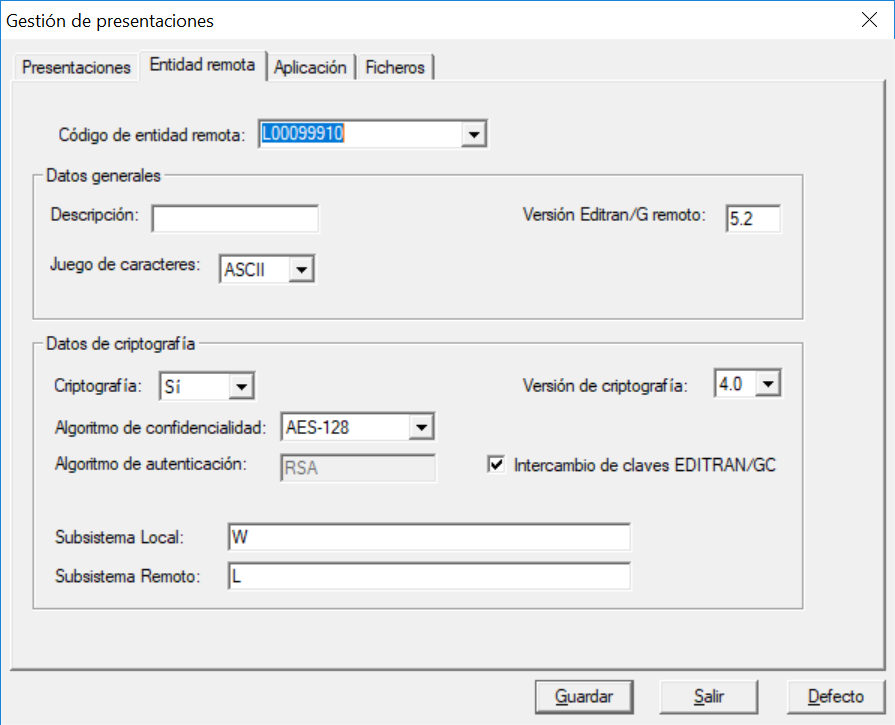 * **Remote entity code:**
Enter the code of the remote entity, which must be the same as the one used in Editran/P.
* **Description:**
Descriptive name of the remote entity.
* **Remote Editran/G version:**
The remote entity's Editran/G version also determines the emission and reception converter to use.
| | |
| ------- | ---------------------------- |
| **4.1** | If the remote entity is V4.1 |
| **5.0** | If the remote entity is V5.0 |
| **5.1** | If the remote entity is V5.1 |
| **5.2** | If the remote entity is V5.2 |
| | |
* **Character set:**
Only if the remote version is 4.1, it is necessary to provide the alphanumeric character set used by the remote machine: **ASCII** or **EBCDIC**. This parameter does not affect the treatment of transmitted data, only certain protocol control information.
* **Cryptography:**
In the cryptography data section, the type of security used to protect the information exchanged by this presentation is established. The options configured here only affect the treatment of the data during the creation of editran buffers. Although it is recommended to use cryptography at this level of the protocol, you could also select **No** and protect only the transmission by properly configuring the Editran/P sessions.
When selecting **Yes** enables the rest of the settings that configure the cryptographic system.
* **Cryptography Version**
* 2.2
> In this mode, DES encryption is performed on the buffer files. The keys used are simple and must have been previously exchanged through a connection with the remote entity configured for this purpose.
* 3.0
> In this mode each transmitted file is encrypted with a different key when forming the buffer. The data encryption key is sent attached, protected according to the chosen authentication algorithm. With authentication **RSA**, the file is also signed to guarantee source authenticity and data integrity. The hash algorithm used is sha-1.
* 4.0
> Extends the functionality of mode 3.0 by incorporating more secure symmetric key encryption algorithms (AES). In this version the only authentication algorithm allowed is RSA, extending the key length up to 4096. The hash algorithm used in the signature is sha-256.
* **Confidentiality Algorithm**
> Symmetric-key encryption algorithms available for cryptography version 3.0 or higher. You can select ***No encryption*** if the only thing desired is to sign the sent files.
* **DES, TDES-2** (Double-key Triple DES), **TDES-3** (Triple-key Triple DES).
* **AES-128, AES-192, AES-256**. Only available for version 4.0.
* **Authentication Algorithm**
> Algorithm used by Editran to protect the data encryption key. It also provides source authentication and integrity of transmitted data.
* **DES:** Maintained for compatibility with earlier versions of the product. Use of RSA is recommended.
* **RSA:** It is the mandatory algorithm when working in mode 4.0.
* **Editran/GC Key Exchange**
> The keys used in public-key cryptography (RSA) are exchanged between entities using the product utility designed for this purpose: Editran/GC. If this "check" is marked, the active key of the configured subsystems is used. See the user manual of E*ditran/GC Key Management* for more information about the utility.
* **Local and Remote Key/Subsystem**
> Auxiliary key labels with DES authentication or Editran/GC subsystems with RSA authentication.
* **APPLICATION TAB**

* **Application**
> Application name. Together with the local and remote codes, it forms the unique identifier of the presentation. It is not mandatory that it match the Editran/ application, although it is recommended that it does so when only one session is used in the presentation.
* **Description**
> Descriptive text for the application.
* **Conversion tables**
> They are text files edited by the user with the correspondence table between the local character coding scheme and editran's own, for both emission and reception. Each line will be of the following type, defining the characters in hexadecimal:
\ \
> If no local translation is needed, these fields will be left blank. Otherwise, enter the file name, but without the last character, which is only used to identify the alphabet: **A** if it is ASCII, or **E** if it is EBCDIC. For example, assuming the user creates the file mitablaA to translate ASCII characters, only mitabla would be entered in the profile.
>
> The table files must be located in the subfolder *bin* of Editran.
* **User programs**
> Called by Editran/G in the pre- and post-emission and reception processes and in exception handling, these programs will be provided by the user when they want to use this feature to integrate the product with other systems. The Editran software includes some sample batch programs that can be used as a template.
>
> These fields are left blank by default. The exception program **utils\\\U\_EXCEPCION** can be used if you want to leave a record in the log files of transmissions that are interrupted.
* **FILES TAB**

* **Presentation Emission Files**
> Each presentation predefines the set of files that will be transmitted each time an emission is requested. Press the button **Add File** to configure a new transmission source and the send characteristics.
* Transmission Source
> Path of the files to be transmitted. Absolute paths are supported, as well as relative paths referring to the directory *bin* of editran or shared resources in UNC notation. In all cases, the wildcards supported by the OS (\*, ?, etc.) can be used.
* Compression (Yes/No)
> LZW compression of the loaded file. On reception it is decompressed according to the control fields of the received buffer.
* Application File Format
> Format conditions are established that files must meet to ensure they are compatible with what is expected in other environments: zOS, iSeries.
>
> **Fixed:** Application files are read in fixed-length blocks (value of the parameter **Application record length**). Optionally, these files can have each block separated by a line break; in this case it is necessary to specify which delimiter is used (CRLF or LF). The delimiters do not reach the receiver; they are removed when loading the file.
>
> **Variable:** Application files are read line by line. CRLF or LF is accepted as a delimiter regardless of the value of the parameter **Delimiter**. In these cases the record length is the maximum value. As with fixed files, the delimiter is removed during the loading process.
>
> **Hybrid:** Application files are variable, but they are sent to the remote side as fixed. Each line is padded with spaces up to the specified record length.
>
> **Binary:** Binary transmission mode. No processing is performed on either format or alphabet.
* Application record length
> Along with the file format, it is sent to the remote installation. In zOS and iSeries environments it is necessary in order to create the received files.
* Alphabet
> This is the original alphabet of the files to be sent. Editran only accepts the possible alphabets **ASCII** or **EBCDIC**. The value **None** indicates that the file is treated as binary.
* ASCII/EBCDIC Translation (Yes/No)
> By setting translate to **Yes**, when the original alphabet is ASCII it is translated to EBCDIC, and if it is EBCDIC it is translated to ASCII. Currently there is a wide variety of encodings that extend US-ASCII (codes 0 to 127), so it must be taken into account that for the correct display of the file at both ends, both platforms must work with compatible tables. For example, if on your Windows platform you work with ISO 8859-1, which includes among others the character 'ñ', when translating it to EBCDIC it is necessary for the mainframe environment to have the equivalent codepage so that it is displayed the same way.
* Delimiter
> Control code that marks the line break (record). Accepted values are **DOS** (CRLF) or **UNIX** (LF).
* Send signed files in Editran/FF
> Checking or unchecking this box enables the sending of signed files through Editran/FF applications. To learn more about the functionality of sending signed files with integrated Editran/FF, see the section Operation of sends using integrated Editran/FF
* **Reception Files**
* Reception destination
> Usually, this is the directory where the received files are left. In this case, the file names are those indicated by the sending entity. If any character not supported by the OS (:,<,>, etc.) appears, it is replaced by '-'.
>
> If what is desired is to normalize the naming of received files at the destination, it is possible to use special wildcards that are interpreted by editran.
* Delimiter
> Only applies to received files with Fixed format. In these cases, the selected delimiter is added at the end of each record. In variable files, the DOS delimiter (CRLF) is always added.
* Translate on reception
> Binary files are never translated. If ASCII is chosen, those received in EBCDIC will be translated and vice versa. If the received file already comes in the specified alphabet, no transformation is performed.
#### Generic profile query
Queries can be filtered by:
* **Presentation**
A list of submissions with their identifiers is obtained.

* **Remote entity**
A list of remote entities with their description is obtained.

* **Application**
A list of applications with their description is obtained.

### Additional functionality
#### Transferred files report
The generation of the daily report of transferred files is an optional functionality that is enabled in the application's configuration settings in the Windows Registry.
For this, before starting the EDITRAN service, a new value must be created in the key `HKEY_LOCAL_MACHINE\SOFTWARE\WOW6432Node\EDITRAN.`
The name of the new value is **ReportPath**, its type is **REG\_SZ** and it sets the **path** where the daily reports will be created.

The name of the generated reports is *FicherosEditran.\.txt*, where yyyymmdd is the current year, month and day. These are files in csv format with columns separated by ','.
Additionally, the level of detail of the data shown in the reports can be established using the DWORD-type value **ReportLevel**.

Below are the fields shown in the daily report of transferred files:
***
| **Field** | **Minimum ReportLevel value to display it** |
| -------------------- | ------------------------------------------- |
| Date-time | 0 |
| Send/receive | 0 |
| Presentation | 0 |
| Local code | 0 |
| Remote code | 0 |
| Application | 0 |
| File path | 0 |
| Format | 0 |
| Source alphabet | 0 |
| Compressed | 0 |
| Encrypted | 0 |
| Size in bytes | 0 |
| Delimiter | 1 |
| Destination alphabet | 1 |
| Signed | 1 |
| Source file name | 1 |
| Record length | 1 |
| Number of records | 1 |
| Concatenated file | 1 |
## Attachments
### Reception destination wildcards
The wildcards that can be specified are:
| | |
| ------ | ---------------------------------------------------------- |
| **+** | If the file exists, append to the previous one |
| **-** | If the file exists, destroy the previous one |
| **%o** | Original name of downloaded file (including the extension) |
| **%D** | Day (DD) |
| **%M** | Month (MM) |
| **%Y** | Year (YYYY) |
| **%h** | Hour (hh) |
| **%m** | Minutes (mm) |
| **%s** | Seconds (ss) |
| **%c** | File counter (c) |
| | |
In the wildcards **%Y** and **%c** the precision of the digits to define can be set by adding a number before the wildcard letter. For example, if %4c is defined, 4 digits will be written.
* **Reception destination examples**
In the examples, the remote entity sends us 4 files.
* Case 1
> We configure the following reception destination:
**../destination\_directory or ../destination\_directory/%o**
***
| **Sent files** | **Downloaded files** |
| -------------- | ------------------------------- |
| a.txt | ../destination\_directory/a.txt |
| b.txt | ../destination\_directory/b.txt |
| c.txt | ../destination\_directory/c.txt |
| d.txt | ../destination\_directory/d.txt |
| | |
> If any of the files existed before downloading, it would be destroyed by the new downloaded file.
* Case 2
> We configure the following reception destination:
**../destination\_directory/+bank\_%D-%M-%Y\_%h-%m-%s**
***
| Sent files | **Downloaded files** |
| ---------- | ---------------------------------------------------- |
| a.txt | ../destination\_directory/bank\_17-10-2014\_14-00-01 |
| b.txt | ../destination\_directory/bank\_17-10-2014\_14-00-02 |
| c.txt | ../destination\_directory/bank\_17-10-2014\_14-00-03 |
| d.txt | ../destination\_directory/bank\_17-10-2014\_14-00-03 |
| | |
> Several files are downloaded, the day, month, year, hour, minute and second are defined for them, and in the case of files c.txt and d.txt, since both are downloaded in the same second, the content of *bank\_17-10-2014\_14-00-03* would be that of those files.
* Case 3
> We configure the following reception destination:
**../destination\_directory/bank-%D-%M-%Y\_%4c**
***
| **Sent files** | **Downloaded files** |
| -------------- | ----------------------------------------------- |
| a.txt | ../destination\_directory/bank\_17-10-2014-0000 |
| b.txt | ../destination\_directory/bank\_17-10-2014-0001 |
| c.txt | ../destination\_directory/bank\_17-10-2014-0002 |
| d.txt | ../destination\_directory/bank\_17-10-2014-0003 |
| | |
> Several files are downloaded in the same session and for each one the day, month and year are defined, plus a 4-digit counter (%4c).
* Case 4
> We configure the following reception destination:
**../destination\_directory/bank\_%o**
***
| **Sent files** | **Downloaded files** |
| -------------- | ------------------------------------- |
| a.txt | ../destination\_directory/bank\_a.txt |
| b.txt | ../destination\_directory/bank\_b.txt |
| c.txt | ../destination\_directory/bank\_c.txt |
| d.txt | ../destination\_directory/bank\_d.txt |
| | |
> The downloaded files will have the defined name plus the original one (including the extension).
* Case 5
> We configure the following reception destination:
**../destination\_directory/+unique\_file**
***
| **Sent files** | **Downloaded files** |
| -------------- | -------------------------------------- |
| a.txt | ../destination\_directory/unique\_file |
| b.txt | ../destination\_directory/unique\_file |
| c.txt | ../destination\_directory/unique\_file |
| d.txt | ../destination\_directory/unique\_file |
| | |
> The content of the downloaded file will be that of files a + b + c + d, due to the +.
* Case 6
> We configure the following reception destination:
**../destination\_directory/unique\_file**
***
| **Sent files** | **Downloaded files** |
| -------------- | -------------------------------------- |
| a.txt | ../destination\_directory/unique\_file |
| b.txt | ../destination\_directory/unique\_file |
| c.txt | ../destination\_directory/unique\_file |
| d.txt | ../destination\_directory/unique\_file |
| | |
> As the files are not differentiated, they will be overwritten as they are downloaded, leaving the final content as that of file d.txt.
* Case 7
We configure the following reception destination:
**../destination-directory/%o\_%D-%M-%Y**
***
| Sent files | **Downloaded files** |
| ---------- | ----------------------------------------- |
| a.txt | ../destination\_directory/a.txt\_17-10-20 |
| b.txt | ../destination\_directory/b.txt\_17-10-20 |
| c.txt | ../destination\_directory/c.txt\_17-10-20 |
| d.txt | ../destination\_directory/d.txt\_17-10-20 |
| | |
> Several files are downloaded in the same session and for each one the original name defined by the remote side (including the extension), the day, month and year are defined.
### COMMANDS
#### gload52
* Description
Processing command for the application files to be sent. The processing consists of transforming and packaging the application files into the *buffer file.* This command is invoked by the process **editrang** when the remote version of the profile is 5.2.
* Syntax
gload52 \
\
\ : Submission identity.
#### gload\[41|50|51]
* Description
Processing command for application files when the remote version of the profile is 5.1 or lower.
* Syntax
gload\[41|50|51] \
\
\: Submission identity.
#### gunload52
* Description
Processing command for the received application files. The processing consists of unpacking and transforming the received application files into the *buffer file.* This command is invoked by the process **editrang** when the remote version of the profile is 5.2.
* Syntax
gunload52 \
\
\: Submission identity.
#### gunload\[41|50|51]
* Description
Processing command for received application files when the remote version of the profile is 5.1 or lower.
* Syntax
gunload\[41|50|51] \
\
\: Submission identity.
#### traduct
* Description
This command allows translating files from **ASCII-EBCDIC** and from **EBCDIC-ASCII**.
If certain characters of the standard tables need to be changed, the following tables must be generated:
* Modifications to the table **ASCII->EBCDIC** must be written in the file **toebcdic.tbl**.
* Modifications to the table **EBCDIC->ASCII** must be written in the file **toascii.tbl**.
> The modifiable characters are the non-alphanumeric ones (a-z, A-Z, 0-9).
>
> The characters specified in the text files must be written in hexadecimal format.
>
> Each modification must be written on one line.
>
> On each line, write the character to be translated and then the translated character separated by a blank space.
* Example:
> To modify the translation of the characters: Ñ ñ Ç ç *(hexadecimal \[decimal] in*
>
> *ASCII: A5\[165], A4\[164], 80\[128] and 87\[135] respectively)*, currently translated to EBCDIC by: AC, 8F, 66 and 8E respectively, it is desired that they be translated by: 7B, 6A, 68 and 67.
>
> The following must be written in the file "toebcdic.tbl":
>
> **A5 7B**
>
> **A4 6A**
>
> **80 68**
>
> **87 67**
>
> In version 5.0 the standard ASCII/EBCDIC tables used by editran were changed. To facilitate the upgrade, in cases where local conversion tables had to be used, the new option **-m**has been included. With this option, specifying the name of the file that stores the current modifications, it is updated with the values appropriate to the new tables.
* Example:
> Suppose an entity had the following ASCII reception table ***tableA*** to adapt the characters Ñ ñ to its environment:
>
> **A4 F1**
>
> **A5 D1**
>
> When executing the command:
traduct -m r tableA table5A
A -> E(41) -> A(50) A
\==========================
a4 -> 6a -> f1 = f1
a5 -> 7b -> d1 = d1
> Each output line is interpreted as follows: the ASCII character 0xA4 that resulted, according to the old translation tables, from EBCDIC character 0x6A, in version 50 would be received as 0xF1, which is the same as the final character of the local table.
>
> If the new received character is the one we expect, as in this case, the line from the new local table will be removed *table5A*.
* Syntax
> traduct. ASCII-EBCDIC translation utility.
>
> V2.0 R0 - Apr 30 2013
>
> Copyright (C) 1991-2011 INDRA
>
> Usage: traduct -a|e source destination
>
> Usage: traduct -t a -t e -c -d -o -x
>
> Usage: traduct -v
>
> Usage: traduct -m \[e|r] tableIn \[tableOut]
>
> Where:
>
> -a : Translation to ASCII.
>
> -e : Translation to EBCDIC.
>
> source : File to translate (stdin by default)
>
> destination: Translated file (stdout by default)
>
> -t a : ASCII table printout.
>
> -t e : EBCDIC table printout (default).
>
> -c : Character.
>
> -d : Decimal.
>
> -o : Octal.
>
> -x : Hexadecimal (default).
>
> -v : Verification
>
> -m \[e|r]: Migration of local send/receive conversion table
>
> tableIn : File with the table to migrate
>
> tableOut: File with the migrated table
#### igacmd
* Description
This command establishes a communication mechanism between applications or user programs and editran/G, allowing operations to be invoked unattended and automatically. It is the equivalent command of the editran/G manager **menug** interactive.
It allows building procedures associated with sends and/or receives, with chaining of new sends or receives.
* Syntax
igacmd. EDItran/G command-mode requester.
Usage: igacmd -o \ -p \ \[-v] \[-w]
Where:
-o \ : Operation to perform.
InitE - Initialize send
LoadE - Load send
Send - Send
EndE - Interrupt send
InitR - Initialize receive
UnloadR - Unload receive
Recv - Receive.
EndR - Interrupt receive.
-p \ : Submission identifier.
-v : Verbose mode.
-w : Wait for the request to finish.
* Example:
> It is desired that at the end of the reception of a certain submission, a send be generated to the remote editran system whose submission is PRUEBA.
>
> For this, the user file after reception will include the following call:
...
igacmd --o Send -p PRUEBA -v
...
> When editran/G invokes the automation associated with the end of reception (previous command), **igacmd** it will in turn send a signal to editran/G indicating that the user has requested a send-start operation for submission PRUEBA.
* Return codes
> In general, the command return codes are those listed in the section editran/G error codes and correspond to the result of the operation performed by editran/G when the request is made with the -w option.
#### menug
* Description
This command allows direct access to the editran/G manager menu.
#### estcmd
* Description
This command is used to check the status of editran/G submissions. If the submission identifier is not specified, the status of all pending sends or receives is listed.
* Syntax
estcmd. EDItran/G submission status display utility.
V52.0 -- MMM DD YYYY
Copyright (C) editran INDRA
Usage: estcmd E|R \[submission]
\
E|R : Send or receive.
\[submission#] : Submission identifier.
* Return codes:
Numeric value corresponding to the following states
INACTIVE 0
LOADING/UNLOADING 1
LOADED 2
TRANSMITTING 3
TRANSMITTED 4
INTERRUPTED 6
#### igaperfi
* Description
This command is used for managing editran/G profiles in command mode. Detailed information about this utility is available in the document "*editran/P and editran/G Profile Management. User Manual*."
* Syntax
Usage: igaperfi: Unattended Introduction Command for EDItran/G Profiles.
V52.0 -- MMM DD YYY
Copyright (C) editran INDRA
Usage: igaperfi \[-h] \[-f\]
\[-r {\[-a \[-V\] \[-R\]] | \[-s\]} \[-o\]]
-h: help (this one)
-f\: name of the file with commands for
profile modification. (default=stdin)
-r: dump EDItran/G presentations to a file.
-s\: EDItran/G presentation to dump.
-a: dump all presentations to a file.
-R\: Release of the file to dump.
Valid values of \ 2..8
-V\: Version of the file to dump.
Valid values of \ 22, 30, 31, 40 and 41
-o\: name of the file in which
the session will be dumped. (default=stdout)
#### modiperfi
* Description
This command is used to modify or unregister the editran/P and editran/G profiles, for both a single session/presentation and several at once.
* Syntax
modiperfi. Utility for profile modification and removal.
V52.0 -- MMM DD YYYY
Copyright (C) editran INDRA
Usage: modiperfi \[-h] | {-o\ \[-r\] \[-a\] \[-l\]
\[-s\|-p\] -m<-Exx=yy ...|-Ixx=yy ...>}
* **Remote entity code:**
Enter the code of the remote entity, which must be the same as the one used in Editran/P.
* **Description:**
Descriptive name of the remote entity.
* **Remote Editran/G version:**
The remote entity's Editran/G version also determines the emission and reception converter to use.
| | |
| ------- | ---------------------------- |
| **4.1** | If the remote entity is V4.1 |
| **5.0** | If the remote entity is V5.0 |
| **5.1** | If the remote entity is V5.1 |
| **5.2** | If the remote entity is V5.2 |
| | |
* **Character set:**
Only if the remote version is 4.1, it is necessary to provide the alphanumeric character set used by the remote machine: **ASCII** or **EBCDIC**. This parameter does not affect the treatment of transmitted data, only certain protocol control information.
* **Cryptography:**
In the cryptography data section, the type of security used to protect the information exchanged by this presentation is established. The options configured here only affect the treatment of the data during the creation of editran buffers. Although it is recommended to use cryptography at this level of the protocol, you could also select **No** and protect only the transmission by properly configuring the Editran/P sessions.
When selecting **Yes** enables the rest of the settings that configure the cryptographic system.
* **Cryptography Version**
* 2.2
> In this mode, DES encryption is performed on the buffer files. The keys used are simple and must have been previously exchanged through a connection with the remote entity configured for this purpose.
* 3.0
> In this mode each transmitted file is encrypted with a different key when forming the buffer. The data encryption key is sent attached, protected according to the chosen authentication algorithm. With authentication **RSA**, the file is also signed to guarantee source authenticity and data integrity. The hash algorithm used is sha-1.
* 4.0
> Extends the functionality of mode 3.0 by incorporating more secure symmetric key encryption algorithms (AES). In this version the only authentication algorithm allowed is RSA, extending the key length up to 4096. The hash algorithm used in the signature is sha-256.
* **Confidentiality Algorithm**
> Symmetric-key encryption algorithms available for cryptography version 3.0 or higher. You can select ***No encryption*** if the only thing desired is to sign the sent files.
* **DES, TDES-2** (Double-key Triple DES), **TDES-3** (Triple-key Triple DES).
* **AES-128, AES-192, AES-256**. Only available for version 4.0.
* **Authentication Algorithm**
> Algorithm used by Editran to protect the data encryption key. It also provides source authentication and integrity of transmitted data.
* **DES:** Maintained for compatibility with earlier versions of the product. Use of RSA is recommended.
* **RSA:** It is the mandatory algorithm when working in mode 4.0.
* **Editran/GC Key Exchange**
> The keys used in public-key cryptography (RSA) are exchanged between entities using the product utility designed for this purpose: Editran/GC. If this "check" is marked, the active key of the configured subsystems is used. See the user manual of E*ditran/GC Key Management* for more information about the utility.
* **Local and Remote Key/Subsystem**
> Auxiliary key labels with DES authentication or Editran/GC subsystems with RSA authentication.
* **APPLICATION TAB**

* **Application**
> Application name. Together with the local and remote codes, it forms the unique identifier of the presentation. It is not mandatory that it match the Editran/ application, although it is recommended that it does so when only one session is used in the presentation.
* **Description**
> Descriptive text for the application.
* **Conversion tables**
> They are text files edited by the user with the correspondence table between the local character coding scheme and editran's own, for both emission and reception. Each line will be of the following type, defining the characters in hexadecimal:
\ \
> If no local translation is needed, these fields will be left blank. Otherwise, enter the file name, but without the last character, which is only used to identify the alphabet: **A** if it is ASCII, or **E** if it is EBCDIC. For example, assuming the user creates the file mitablaA to translate ASCII characters, only mitabla would be entered in the profile.
>
> The table files must be located in the subfolder *bin* of Editran.
* **User programs**
> Called by Editran/G in the pre- and post-emission and reception processes and in exception handling, these programs will be provided by the user when they want to use this feature to integrate the product with other systems. The Editran software includes some sample batch programs that can be used as a template.
>
> These fields are left blank by default. The exception program **utils\\\U\_EXCEPCION** can be used if you want to leave a record in the log files of transmissions that are interrupted.
* **FILES TAB**

* **Presentation Emission Files**
> Each presentation predefines the set of files that will be transmitted each time an emission is requested. Press the button **Add File** to configure a new transmission source and the send characteristics.
* Transmission Source
> Path of the files to be transmitted. Absolute paths are supported, as well as relative paths referring to the directory *bin* of editran or shared resources in UNC notation. In all cases, the wildcards supported by the OS (\*, ?, etc.) can be used.
* Compression (Yes/No)
> LZW compression of the loaded file. On reception it is decompressed according to the control fields of the received buffer.
* Application File Format
> Format conditions are established that files must meet to ensure they are compatible with what is expected in other environments: zOS, iSeries.
>
> **Fixed:** Application files are read in fixed-length blocks (value of the parameter **Application record length**). Optionally, these files can have each block separated by a line break; in this case it is necessary to specify which delimiter is used (CRLF or LF). The delimiters do not reach the receiver; they are removed when loading the file.
>
> **Variable:** Application files are read line by line. CRLF or LF is accepted as a delimiter regardless of the value of the parameter **Delimiter**. In these cases the record length is the maximum value. As with fixed files, the delimiter is removed during the loading process.
>
> **Hybrid:** Application files are variable, but they are sent to the remote side as fixed. Each line is padded with spaces up to the specified record length.
>
> **Binary:** Binary transmission mode. No processing is performed on either format or alphabet.
* Application record length
> Along with the file format, it is sent to the remote installation. In zOS and iSeries environments it is necessary in order to create the received files.
* Alphabet
> This is the original alphabet of the files to be sent. Editran only accepts the possible alphabets **ASCII** or **EBCDIC**. The value **None** indicates that the file is treated as binary.
* ASCII/EBCDIC Translation (Yes/No)
> By setting translate to **Yes**, when the original alphabet is ASCII it is translated to EBCDIC, and if it is EBCDIC it is translated to ASCII. Currently there is a wide variety of encodings that extend US-ASCII (codes 0 to 127), so it must be taken into account that for the correct display of the file at both ends, both platforms must work with compatible tables. For example, if on your Windows platform you work with ISO 8859-1, which includes among others the character 'ñ', when translating it to EBCDIC it is necessary for the mainframe environment to have the equivalent codepage so that it is displayed the same way.
* Delimiter
> Control code that marks the line break (record). Accepted values are **DOS** (CRLF) or **UNIX** (LF).
* Send signed files in Editran/FF
> Checking or unchecking this box enables the sending of signed files through Editran/FF applications. To learn more about the functionality of sending signed files with integrated Editran/FF, see the section Operation of sends using integrated Editran/FF
* **Reception Files**
* Reception destination
> Usually, this is the directory where the received files are left. In this case, the file names are those indicated by the sending entity. If any character not supported by the OS (:,<,>, etc.) appears, it is replaced by '-'.
>
> If what is desired is to normalize the naming of received files at the destination, it is possible to use special wildcards that are interpreted by editran.
* Delimiter
> Only applies to received files with Fixed format. In these cases, the selected delimiter is added at the end of each record. In variable files, the DOS delimiter (CRLF) is always added.
* Translate on reception
> Binary files are never translated. If ASCII is chosen, those received in EBCDIC will be translated and vice versa. If the received file already comes in the specified alphabet, no transformation is performed.
#### Generic profile query
Queries can be filtered by:
* **Presentation**
A list of submissions with their identifiers is obtained.

* **Remote entity**
A list of remote entities with their description is obtained.

* **Application**
A list of applications with their description is obtained.

### Additional functionality
#### Transferred files report
The generation of the daily report of transferred files is an optional functionality that is enabled in the application's configuration settings in the Windows Registry.
For this, before starting the EDITRAN service, a new value must be created in the key `HKEY_LOCAL_MACHINE\SOFTWARE\WOW6432Node\EDITRAN.`
The name of the new value is **ReportPath**, its type is **REG\_SZ** and it sets the **path** where the daily reports will be created.

The name of the generated reports is *FicherosEditran.\.txt*, where yyyymmdd is the current year, month and day. These are files in csv format with columns separated by ','.
Additionally, the level of detail of the data shown in the reports can be established using the DWORD-type value **ReportLevel**.

Below are the fields shown in the daily report of transferred files:
***
| **Field** | **Minimum ReportLevel value to display it** |
| -------------------- | ------------------------------------------- |
| Date-time | 0 |
| Send/receive | 0 |
| Presentation | 0 |
| Local code | 0 |
| Remote code | 0 |
| Application | 0 |
| File path | 0 |
| Format | 0 |
| Source alphabet | 0 |
| Compressed | 0 |
| Encrypted | 0 |
| Size in bytes | 0 |
| Delimiter | 1 |
| Destination alphabet | 1 |
| Signed | 1 |
| Source file name | 1 |
| Record length | 1 |
| Number of records | 1 |
| Concatenated file | 1 |
## Attachments
### Reception destination wildcards
The wildcards that can be specified are:
| | |
| ------ | ---------------------------------------------------------- |
| **+** | If the file exists, append to the previous one |
| **-** | If the file exists, destroy the previous one |
| **%o** | Original name of downloaded file (including the extension) |
| **%D** | Day (DD) |
| **%M** | Month (MM) |
| **%Y** | Year (YYYY) |
| **%h** | Hour (hh) |
| **%m** | Minutes (mm) |
| **%s** | Seconds (ss) |
| **%c** | File counter (c) |
| | |
In the wildcards **%Y** and **%c** the precision of the digits to define can be set by adding a number before the wildcard letter. For example, if %4c is defined, 4 digits will be written.
* **Reception destination examples**
In the examples, the remote entity sends us 4 files.
* Case 1
> We configure the following reception destination:
**../destination\_directory or ../destination\_directory/%o**
***
| **Sent files** | **Downloaded files** |
| -------------- | ------------------------------- |
| a.txt | ../destination\_directory/a.txt |
| b.txt | ../destination\_directory/b.txt |
| c.txt | ../destination\_directory/c.txt |
| d.txt | ../destination\_directory/d.txt |
| | |
> If any of the files existed before downloading, it would be destroyed by the new downloaded file.
* Case 2
> We configure the following reception destination:
**../destination\_directory/+bank\_%D-%M-%Y\_%h-%m-%s**
***
| Sent files | **Downloaded files** |
| ---------- | ---------------------------------------------------- |
| a.txt | ../destination\_directory/bank\_17-10-2014\_14-00-01 |
| b.txt | ../destination\_directory/bank\_17-10-2014\_14-00-02 |
| c.txt | ../destination\_directory/bank\_17-10-2014\_14-00-03 |
| d.txt | ../destination\_directory/bank\_17-10-2014\_14-00-03 |
| | |
> Several files are downloaded, the day, month, year, hour, minute and second are defined for them, and in the case of files c.txt and d.txt, since both are downloaded in the same second, the content of *bank\_17-10-2014\_14-00-03* would be that of those files.
* Case 3
> We configure the following reception destination:
**../destination\_directory/bank-%D-%M-%Y\_%4c**
***
| **Sent files** | **Downloaded files** |
| -------------- | ----------------------------------------------- |
| a.txt | ../destination\_directory/bank\_17-10-2014-0000 |
| b.txt | ../destination\_directory/bank\_17-10-2014-0001 |
| c.txt | ../destination\_directory/bank\_17-10-2014-0002 |
| d.txt | ../destination\_directory/bank\_17-10-2014-0003 |
| | |
> Several files are downloaded in the same session and for each one the day, month and year are defined, plus a 4-digit counter (%4c).
* Case 4
> We configure the following reception destination:
**../destination\_directory/bank\_%o**
***
| **Sent files** | **Downloaded files** |
| -------------- | ------------------------------------- |
| a.txt | ../destination\_directory/bank\_a.txt |
| b.txt | ../destination\_directory/bank\_b.txt |
| c.txt | ../destination\_directory/bank\_c.txt |
| d.txt | ../destination\_directory/bank\_d.txt |
| | |
> The downloaded files will have the defined name plus the original one (including the extension).
* Case 5
> We configure the following reception destination:
**../destination\_directory/+unique\_file**
***
| **Sent files** | **Downloaded files** |
| -------------- | -------------------------------------- |
| a.txt | ../destination\_directory/unique\_file |
| b.txt | ../destination\_directory/unique\_file |
| c.txt | ../destination\_directory/unique\_file |
| d.txt | ../destination\_directory/unique\_file |
| | |
> The content of the downloaded file will be that of files a + b + c + d, due to the +.
* Case 6
> We configure the following reception destination:
**../destination\_directory/unique\_file**
***
| **Sent files** | **Downloaded files** |
| -------------- | -------------------------------------- |
| a.txt | ../destination\_directory/unique\_file |
| b.txt | ../destination\_directory/unique\_file |
| c.txt | ../destination\_directory/unique\_file |
| d.txt | ../destination\_directory/unique\_file |
| | |
> As the files are not differentiated, they will be overwritten as they are downloaded, leaving the final content as that of file d.txt.
* Case 7
We configure the following reception destination:
**../destination-directory/%o\_%D-%M-%Y**
***
| Sent files | **Downloaded files** |
| ---------- | ----------------------------------------- |
| a.txt | ../destination\_directory/a.txt\_17-10-20 |
| b.txt | ../destination\_directory/b.txt\_17-10-20 |
| c.txt | ../destination\_directory/c.txt\_17-10-20 |
| d.txt | ../destination\_directory/d.txt\_17-10-20 |
| | |
> Several files are downloaded in the same session and for each one the original name defined by the remote side (including the extension), the day, month and year are defined.
### COMMANDS
#### gload52
* Description
Processing command for the application files to be sent. The processing consists of transforming and packaging the application files into the *buffer file.* This command is invoked by the process **editrang** when the remote version of the profile is 5.2.
* Syntax
gload52 \
\
\ : Submission identity.
#### gload\[41|50|51]
* Description
Processing command for application files when the remote version of the profile is 5.1 or lower.
* Syntax
gload\[41|50|51] \
\
\: Submission identity.
#### gunload52
* Description
Processing command for the received application files. The processing consists of unpacking and transforming the received application files into the *buffer file.* This command is invoked by the process **editrang** when the remote version of the profile is 5.2.
* Syntax
gunload52 \
\
\: Submission identity.
#### gunload\[41|50|51]
* Description
Processing command for received application files when the remote version of the profile is 5.1 or lower.
* Syntax
gunload\[41|50|51] \
\
\: Submission identity.
#### traduct
* Description
This command allows translating files from **ASCII-EBCDIC** and from **EBCDIC-ASCII**.
If certain characters of the standard tables need to be changed, the following tables must be generated:
* Modifications to the table **ASCII->EBCDIC** must be written in the file **toebcdic.tbl**.
* Modifications to the table **EBCDIC->ASCII** must be written in the file **toascii.tbl**.
> The modifiable characters are the non-alphanumeric ones (a-z, A-Z, 0-9).
>
> The characters specified in the text files must be written in hexadecimal format.
>
> Each modification must be written on one line.
>
> On each line, write the character to be translated and then the translated character separated by a blank space.
* Example:
> To modify the translation of the characters: Ñ ñ Ç ç *(hexadecimal \[decimal] in*
>
> *ASCII: A5\[165], A4\[164], 80\[128] and 87\[135] respectively)*, currently translated to EBCDIC by: AC, 8F, 66 and 8E respectively, it is desired that they be translated by: 7B, 6A, 68 and 67.
>
> The following must be written in the file "toebcdic.tbl":
>
> **A5 7B**
>
> **A4 6A**
>
> **80 68**
>
> **87 67**
>
> In version 5.0 the standard ASCII/EBCDIC tables used by editran were changed. To facilitate the upgrade, in cases where local conversion tables had to be used, the new option **-m**has been included. With this option, specifying the name of the file that stores the current modifications, it is updated with the values appropriate to the new tables.
* Example:
> Suppose an entity had the following ASCII reception table ***tableA*** to adapt the characters Ñ ñ to its environment:
>
> **A4 F1**
>
> **A5 D1**
>
> When executing the command:
traduct -m r tableA table5A
A -> E(41) -> A(50) A
\==========================
a4 -> 6a -> f1 = f1
a5 -> 7b -> d1 = d1
> Each output line is interpreted as follows: the ASCII character 0xA4 that resulted, according to the old translation tables, from EBCDIC character 0x6A, in version 50 would be received as 0xF1, which is the same as the final character of the local table.
>
> If the new received character is the one we expect, as in this case, the line from the new local table will be removed *table5A*.
* Syntax
> traduct. ASCII-EBCDIC translation utility.
>
> V2.0 R0 - Apr 30 2013
>
> Copyright (C) 1991-2011 INDRA
>
> Usage: traduct -a|e source destination
>
> Usage: traduct -t a -t e -c -d -o -x
>
> Usage: traduct -v
>
> Usage: traduct -m \[e|r] tableIn \[tableOut]
>
> Where:
>
> -a : Translation to ASCII.
>
> -e : Translation to EBCDIC.
>
> source : File to translate (stdin by default)
>
> destination: Translated file (stdout by default)
>
> -t a : ASCII table printout.
>
> -t e : EBCDIC table printout (default).
>
> -c : Character.
>
> -d : Decimal.
>
> -o : Octal.
>
> -x : Hexadecimal (default).
>
> -v : Verification
>
> -m \[e|r]: Migration of local send/receive conversion table
>
> tableIn : File with the table to migrate
>
> tableOut: File with the migrated table
#### igacmd
* Description
This command establishes a communication mechanism between applications or user programs and editran/G, allowing operations to be invoked unattended and automatically. It is the equivalent command of the editran/G manager **menug** interactive.
It allows building procedures associated with sends and/or receives, with chaining of new sends or receives.
* Syntax
igacmd. EDItran/G command-mode requester.
Usage: igacmd -o \ -p \ \[-v] \[-w]
Where:
-o \ : Operation to perform.
InitE - Initialize send
LoadE - Load send
Send - Send
EndE - Interrupt send
InitR - Initialize receive
UnloadR - Unload receive
Recv - Receive.
EndR - Interrupt receive.
-p \ : Submission identifier.
-v : Verbose mode.
-w : Wait for the request to finish.
* Example:
> It is desired that at the end of the reception of a certain submission, a send be generated to the remote editran system whose submission is PRUEBA.
>
> For this, the user file after reception will include the following call:
...
igacmd --o Send -p PRUEBA -v
...
> When editran/G invokes the automation associated with the end of reception (previous command), **igacmd** it will in turn send a signal to editran/G indicating that the user has requested a send-start operation for submission PRUEBA.
* Return codes
> In general, the command return codes are those listed in the section editran/G error codes and correspond to the result of the operation performed by editran/G when the request is made with the -w option.
#### menug
* Description
This command allows direct access to the editran/G manager menu.
#### estcmd
* Description
This command is used to check the status of editran/G submissions. If the submission identifier is not specified, the status of all pending sends or receives is listed.
* Syntax
estcmd. EDItran/G submission status display utility.
V52.0 -- MMM DD YYYY
Copyright (C) editran INDRA
Usage: estcmd E|R \[submission]
\
E|R : Send or receive.
\[submission#] : Submission identifier.
* Return codes:
Numeric value corresponding to the following states
INACTIVE 0
LOADING/UNLOADING 1
LOADED 2
TRANSMITTING 3
TRANSMITTED 4
INTERRUPTED 6
#### igaperfi
* Description
This command is used for managing editran/G profiles in command mode. Detailed information about this utility is available in the document "*editran/P and editran/G Profile Management. User Manual*."
* Syntax
Usage: igaperfi: Unattended Introduction Command for EDItran/G Profiles.
V52.0 -- MMM DD YYY
Copyright (C) editran INDRA
Usage: igaperfi \[-h] \[-f\]
\[-r {\[-a \[-V\] \[-R\]] | \[-s\]} \[-o\]]
-h: help (this one)
-f\: name of the file with commands for
profile modification. (default=stdin)
-r: dump EDItran/G presentations to a file.
-s\: EDItran/G presentation to dump.
-a: dump all presentations to a file.
-R\: Release of the file to dump.
Valid values of \ 2..8
-V\: Version of the file to dump.
Valid values of \ 22, 30, 31, 40 and 41
-o\: name of the file in which
the session will be dumped. (default=stdout)
#### modiperfi
* Description
This command is used to modify or unregister the editran/P and editran/G profiles, for both a single session/presentation and several at once.
* Syntax
modiperfi. Utility for profile modification and removal.
V52.0 -- MMM DD YYYY
Copyright (C) editran INDRA
Usage: modiperfi \[-h] | {-o\ \[-r\] \[-a\] \[-l\]
\[-s\|-p\] -m<-Exx=yy ...|-Ixx=yy ...>}
\| {-b -o\ -s\
\
-h: Help information.
-o\: Identifier of the profile option you want to
modify. 'P' to modify EDItran/P profiles,
'G' for EDItran/G ones and 'F' for the
file-related modifications.
-c: Only compatible with option "-oF". If the file to modify
does not exist, it is created.
-r\: Remote identifier. Only the
significant digits need be entered.
-a\: Application identifier. Supports the
metacharacters '\*' and '?' as wildcards.
-l\: Local identifier. Only the
significant digits need be entered.
-s\|-p\: Identifiers of the session and the
presentation respectively. They support the
metacharacters '\*' and '?' as wildcards.
-m<-Exx=yy ...|-Ixx=yy ...>: Identifier of the modifications. Sets
the parameter(s) of the EDItran/P or
EDItran/G profile 'xx' to 'yy' (see the
cfgupt command manual or run "cfgupt -H").
-b: Indicates that a session or presentation will be unregistered.
#### USER PROGRAMS
* Description
These programs will be provided by the user and will be called during the presentation processes.
* Syntax
Depending on when they are executed there are three types of user programs:
* Before Sending/Receiving. If the user configures any program, it will be the first step performed when a send starts. These programs are invoked with the following arguments:
* **0** Program name.
* **1** Presentation.
* **2** Indicates sending (E) or receiving (R).
* **3** Local Code
* **4** Remote code
* **5** Application
* After Sending/Receiving. If the user configures any program, it will be launched when the transmission ends successfully. Each time a presentation sends or receives, a file is generated containing the list of transmitted files. This file is the one recommended for integration with other applications. For example, it could be used to store the path of the transmitted files in a database. These programs are invoked with the following arguments:
* **0** Program name.
* **1** Presentation.
* **2** Indicates sending (E) or receiving (R).
* **3** Local Code
* **4** Remote code
* **5** Application
* **6** Absolute path of the file that stores the list of sent or received files. New in v5.2
Each sent/received file listing file has the following fields separated by ',':
| **File field** | **Minimum ReportLevel value to display it** |
| ----------------- | ------------------------------------------- |
| File path | 0 |
| Format | 1 |
| Record length | 1 |
| Number of records | 1 |
| Concatenated file | 1 |
| | |
* **Example:** Batch program that deletes the sent files (with ReportLevel=0 format)
@echo off
echo ###############################################
echo USER SCRIPT AFTER SENDING: %0.
timestamp
echo PRESENTATION : %2-%1 (%3-%4-%5)
echo ###############################################
FOR /F %%p IN (%6) DO del /Q %%p > NUL 2>NUL
goto:EOF
* **Example:** Batch program that deletes the sent files (with ReportLevel=1 format)
@echo off
echo ###############################################
echo USER SCRIPT AFTER SENDING: %0.
timestamp
echo PRESENTATION : %2-%1 (%3-%4-%5)
echo ###############################################
FOR /F "tokens=1 delims=," %%p IN (%6) DO del /Q "%%p" > NUL 2>NUL
goto:EOF
* Exception. If the user configures any exception program, it will be launched whenever any error occurs during sending or receiving. In this way editran could be integrated with some alert mechanism developed by the user. These programs are invoked with the following arguments:
* **0** Program name.
* **1** Presentation.
* **2** Indicates sending (E) or receiving (R).
* **3** Result
* **4** Local Code
* **5** Remote code
* **6** Application
**Backward compatibility**
The parameters that Editran passes to user programs have changed in this version. It is recommended to adapt programs developed in previous versions when upgrading the product. If that is not possible, you can continue working with the old programs by configuring the installation to work in compatible mode. This mode is enabled when the Windows registry contains the DWORD value ***GUpgrade*** in the key *EDITRAN*.

### Data files
#### CFG subfolder
* **editrang.cfg**
Editran/G configuration file. Stores the local profile and the presentation profiles. It is not an editable file; it must only be modified from the user interface.
* **ckds.des**
File that stores the auxiliary keys for exchanging session keys in DES encryption version 2.2.
#### DOC subfolder
* **editran.html**
Editran documentation containing quick setup and reference guides.
#### BIN subfolder
* **editrang.msg**
File where the messages shown to the Editran/G operator are stored.
**SL subfolder**
* **licencia.dat**
Editran license file. It is used to control the contracted functionality. If this file does not exist or its content is altered, the editran service cannot be started.
**utils subfolder**
* **U\_PREVIO, U\_POSTERIOR, U\_EXCEPCION**
This folder contains batch programs that serve as examples for the integration programs users develop as pre- and post-processors. Functionally they only print log messages that will remain in *editrang.out*.
> NOTE: It is recommended that new user programs be left in this subfolder or in a specific one that contains only those files.
* **PSTEMIGC, PSTRECGC**
Batch programs that automate RSA key exchange. They are the user programs after sending and receiving of the presentation used by Editran/GC for key transmission.
#### LOG subfolder
* **editrang.log**
File created with the **makelog**. It cyclically stores the summary of operations performed by Editran/G, so once the maximum number of entries is reached it overwrites the oldest one.
It can be consulted from the Editran/G menu and using the ***printlog*** command described in the Editran/P user manual *Editran/P*.
* **editrang.out**
File where all outputs produced by Editran/G and the procedures and commands launched by this process are recorded. It is the file where the user will find the details of the errors produced during load and download processes. Below, some cases are listed as examples.
> NOTE: Files with the "out" extension are plain text and may change from one version to another. Applications should not process this file to extract information from it, as they could stop working with product updates.
Output of a correctly completed send configured with the post-send program provided in the installation.
\*\*\*\*\*\*\*\*\*\*\*\*\*\*\*\*\*\*\*\*\*\*\*\*\*\*\*\*\*\*\*\*\*\*\*\*\*\*\*\*\*\*\*\*\*\*\*\*\*\*\*\*\*\*\*\*\*\*\*\*\*\*\*\*\*\*\*\*\*\*
CONVERSION DURING SEND OF PRESENTATION \[CICS-TCP-02]
DATE-TIME: \[13/06/2019 10:15:33]
VERSION: \[52]
\# C F A T D L.Reg Modification date Size Sent Loaded Name
\_\_\_\_\_\_\_\_\_\_\_\_\_\_\_\_\_\_\_\_\_\_\_\_\_\_\_\_\_\_\_\_\_\_\_\_\_\_\_\_\_\_\_\_\_\_\_\_\_\_\_\_\_\_\_\_\_\_\_\_\_\_\_\_\_\_\_\_\_\_\_\_\_\_\_\_\_\_\_\_\_\_\_\_\_\_\_\_\_\_\_\_\_
1 N F A N D 00080 23042009 103514 000001112166 000001085040 000001085040 fichfijo.txt
2 N V A N 00047 23042009 103622 000001152669 000001070727 000001070727 variable.txt
3 N H A N 00100 11102017 094055 000001115010 000003159000 000003159000 hibrido.txt
4 N B N N 04020 30112005 104408 000000547005 000000547005 000000547005 binario.pdf
5 N F A N N 00100 11102017 123929 000000000000 000000000000 000000000000 vacio.txt
RESULT: \[0]
\*\*\*\*\*\*\*\*\*\*\*\*\*\*\*\*\*\*\*\*\*\*\*\*\*\*\*\*\*\*\*\*\*\*\*\*\*\*\*\*\*\*\*\*\*\*\*\*\*\*\*\*\*\*\*\*\*\*\*\*\*\*\*\*\*\*\*\*\*\*
\################################################################################
USER SCRIPT AFTER TRANSMISSION: utils\U\_POSTERIOR.bat.
Thu Jun 13 10:16:24 2019
PRESENTATION : E-CICS-TCP-02 (W00099910-000099990-PRTCP2)
FILES : C:\EDITRAN\_DATA/tmp/CICS-TCP-02E.ficheros
\################################################################################
\[13/06/2019 10:16:24]\[END PRESENTATION]\[CICS-TCP-02]\[SENDING]: RESULT \[0]\[Correct result]
Output of a send that fails because the configured file does not exist
\*\*\*\*\*\*\*\*\*\*\*\*\*\*\*\*\*\*\*\*\*\*\*\*\*\*\*\*\*\*\*\*\*\*\*\*\*\*\*\*\*\*\*\*\*\*\*\*\*\*\*\*\*\*\*\*\*\*\*\*\*\*\*\*\*\*\*\*\*
CONVERSION DURING SEND OF PRESENTATION \[CICS-TCP-01]
DATE-TIME: \[13/06/2019 10:33:14]
VERSION: \[52]
RESULT: CFG\_NO\_FILES \[-90]
\*\*\*\*\*\*\*\*\*\*\*\*\*\*\*\*\*\*\*\*\*\*\*\*\*\*\*\*\*\*\*\*\*\*\*\*\*\*\*\*\*\*\*\*\*\*\*\*\*\*\*\*\*\*\*\*\*\*\*\*\*\*\*\*\*\*\*\*\*\*
\################################################################################
EXCEPTION USER SCRIPT: utils\U\_EXCEPCION.bat.
Thu Jun 13 10:33:14 2019
PRESENTATION : E-CICS-TCP-01 (W00099910-000099990-PRTCP1)
RESULT: 0090
\################################################################################
\[13/06/2019 10:33:14]\[END PRESENTATION]\[CICS-TCP-01]\[SENDING]: RESULT \[90]\[No application files to send]
**Presentation-specific log**
In this version, editran can be configured so that the information in the file **editrang.out** is separated by presentation. To change it, create in the Windows registry the DWORD value ***GLogPresentacion*** in the editran key as shown in the image. The different files will also be left in the **log** subfolder of the installation and are named **\.log**. Unlike what happens with the file **editrang.out**, these can be moved or deleted without needing to stop the service.

### CODES AND MESSAGES TO THE OPERATOR
#### Editran/G messages
These codes are the ones reflected in the file **editrang.log** to indicate the different states a presentation goes through. On the editran/G operator screen, they appear in the form of messages.
Next, these codes and messages are detailed with a brief explanation or recommended action:
***
| MESSAGE | EXPLANATION/RECOMMENDED ACTION |
| ----------------------------------------------------- | ------------------------------------------------------------------------------------------------------------------------------------------------------------------------------------------------------------------------------------------- |
| Send load request | A presentation send load request has been made. |
| Send request | A presentation send request has been received. |
| Send end request | A request has been made to interrupt the current presentation send. |
| Send initialization request | A request has been made to cancel the current presentation send. |
| Send canceled | The request to initialize the presentation send has been processed correctly. |
| Send initialization request | A request has been made to cancel the current presentation reception. |
| Reception canceled | |
| Receive download request | A presentation receive request has been made. |
| Receive request | A presentation receive request has been received. |
| Receive end request | A request has been made to interrupt the current presentation reception. |
| The presentation is initialized | A request has been made to initialize a send or receive and the presentation has no pending transmission. |
| The presentation is being transmitted | A request has been made to send/receive a presentation that is already being transmitted. |
| Presentation state incompatible with the request () | An incompatible request has been made with the state of the presentation. For example: request to initialize a sending presentation that is being transmitted. |
| The presentation profile does not exist | Register the corresponding presentation profile in the editran/G administrator. |
| The session profile does not exist | Register the corresponding session profile in the editran/P administrator. |
| Requests send to editran (AR1) *\* | editran/P is notified to start sending a transmission session of the presentation. |
| Requests send end to Editran (EDP) *\* | editran/P is notified to interrupt a transmission session of the presentation. |
| Sending interrupted | The request to end the presentation send has been processed correctly. |
| Correct and completed send conversion | The process of loading the buffers to be sent has been completed successfully. |
| Correct and completed receive converter | The process of downloading the received buffers has been completed successfully. |
| Error in send conversion process | The buffers to be sent cannot be loaded. Consult the editrang.out file for more details about the error. |
| Error in receive conversion process | The received buffers cannot be downloaded. Consult the editrang.out file for more details about the error. |
| Requests receive from editran (AR2)*\* | editran/P is notified to start receiving a transmission session of the presentation. |
| Requests receive end to Editran (EDR) *\* | editran/P is notified to interrupt the reception of a transmission session of the presentation. |
| Reception interrupted | A request to end reception has been processed correctly. |
| editran send request (A1P) *\* | editran/P notifies that a remote request has been received for the indicated transmission session to be sent. Buffer loading is ordered if they do not exist. |
| editran receive request (A2P) *\* | editran/P notifies that a remote request has been received to start receiving through the indicated transmission session. |
| editran session sent (A3P) *\* | editran/P notifies that sending of the buffer file for the indicated session has ended. Sending ends when the A3P messages from all transmission sessions of the presentation are received. |
| editran session received (A4P) *\* | editran/P notifies that reception of the buffer file for the indicated session has ended. When all A4P messages from the presentation's transmission sessions are received, the buffer download process is performed, which ends reception. |
| editran session interrupted (A7I) *\* | editran/P notifies that the indicated transmission session has been interrupted. |
| End post send editran session (A3R) | Response to editran/P for message A3P. |
| End post receive editran session (A4R) | Response to editran/P for message A4P. |
| No buffer available (A1R-) *\* | Response sent to editran/P when the loading process fails upon receiving message A1P. The remote that made the request will receive an A7I message with code 121. |
| Launch previous user process | The user process indicated in profiles has been launched. |
| Previous user process finished | The user process indicated in profiles has finished correctly. |
| Error in previous user process | The user process indicated in profiles has finished with an error. Consult the cause in the editrang.out file. |
| Launch post user process | The user process indicated in profiles has been launched. |
| Post user process finished | The user process indicated in profiles has finished correctly. |
| Error in post user process | The user process indicated in profiles has finished with an error. Consult the cause in the editrang.out file. |
| No buffer available (A2R-) *\* | Response sent to editran/P when the reception preparation process fails upon receiving message A2P. |
| Waiting for remote download confirmation | result of the remote download to consider it finished. |
| Confirmation request | The remote entity is asked to confirm the status of its reception. |
| Reception confirmation result:*\* | Response received from the remote entity about the status of its reception. |
| Canceled wait for remote download confirmation | The user has decided to initialize a send that was pending remote download confirmation. |
| Transmission completed successfully \[*\*] | Informational message when a SEND or RECEIVE finishes. |
| Exception: *\* | A runtime error has occurred. |
| | |
#### Editran/G error codes
This table documents the different error codes that can occur during a transmission.
The table shows:
*COD* is the numerical value passed as a parameter to the exception user script that runs when transmission fails. If the ***igacmd*** command is used as an editran/G API, it is the returned value when used with the option ***--w*** (wait for transmission end).
*ID* is the alias that identifies the error in the messages recorded in the Log file.
*MESSAGE* is a brief description of the reason for the error.
***
| *COD* | *ID* | *MESSAGE* |
| ----- | ------------------ | ------------------------------------------------------------------------------------------------------------------------------------------------------------------------- |
| 0 | | Correct result |
| 1 | CMD\_EXEC | System error: process creation. |
| 50 | APIG\_SNTX | APIG: incorrect parameters. |
| 51 | APIG\_INIT | APIG: editran/G not started or not accessible. |
| 52 | APIG\_GREQ | APIG: Error communicating with editran/G (request). |
| 54 | APIG\_GRES | APIG: Error communicating with editran/G (response). |
| 62 | NO\_TAMPON | Incorrect buffer file format. |
| 64 | OPEN\_IN | Error opening application file to be sent. |
| 65 | OPEN\_OUT | Error opening application file to be received. |
| 66 | READ\_CTRL | Error reading control information in TAMPON or CSB. |
| 67 | WRITE\_CTRL | Error writing control information in TAMPON or CSB. |
| 68 | WRITE\_DATA | Error writing data to TAMPON or CSB. |
| 69 | ZERO\_REC | TAMPON file with no loaded records. |
| 70 | ALLOC\_ERROR | System error: memory handling. |
| 71 | SAVE\_REL | Error saving the list of transmitted files. |
| 73 | WRITE\_OUT | Error writing the application file to be received. |
| 74 | SEQUENCE\_CSB | Incorrect CSB file: sequence error. |
| 75 | TOTAL\_FILES | Incorrect CSB file: error in the total number of files. |
| 76 | TYPE\_FILE | Unknown file format. |
| 77 | LENGTH\_CSBREC | Incorrect CSB file: error in the file lengths. |
| 78 | HASH\_FILE | Error calculating/verifying application file hash. |
| 79 | SIZE\_FILERECS | Mismatch in the number of records in the application file. The total number of records indicated in the CSB control fields does not match the number actually downloaded. |
| 80 | TOTAL\_CSBRECS | Incorrect CSB file: error in the total number of records. |
| 81 | SIZE\_FILEBYTES | Mismatch in the total bytes of the application file. The number of bytes indicated in the CSB control fields does not match the number actually downloaded. |
| 82 | SYNCS\_CSB | Mismatch in the number of synchronisms in CSB. |
| 83 | CFG\_LENGTH | Application file with record smaller than the one given in the profile. Review the characteristics of the files to be sent. |
| 84 | STS\_RECV | Error in the download process because not all buffer files of the presentation were received. |
| 85 | OPEN\_CSB | Error opening/creating CSB file. |
| 86 | NO\_PERFILG\_LOCAL | No local editran/G profile exists. |
| 87 | NO\_PERFILG | There is no Presentation profile. |
| 90 | CFG\_NO\_FILES | None of the files specified in the profile as sending files exist or can be found. |
| 91 | USER\_SCRIPT | Error executing user script. |
| 93 | PROFILES | Presentation profile incompatible with the upload/download process. |
| 94 | CANCELED\_REQ | Transmission canceled. |
| 95 | PROC\_ERROR | Internal error: task creation in upload/download. |
| 96 | RUNTIME\_EXCEPT | System error: "runtime excepction". |
| 97 | NO\_LICENSE | License problem to perform one of the required functions. |
| 98 | CRYPT\_ERROR | Error in the cryptographic handling of the data. |
| 99 | HDRFILE | Internal error: invalid control headers. |
| 200 | NO\_ACK | The remote download could not be confirmed. |
| 201 | NO\_STATE | Request incompatible with the state of the transmission. |
| 104 | EXCEPT\_P | Editran/P: Abort |
| 110 | EXCEPT\_P | Editran/P: Operator |
| 120 | EXCEPT\_P | Editran/P: Incorrect remote buffer. Launch previous. |
| 121 | EXCEPT\_P | Editran/P: Incorrect remote buffer. No previous exists. |
| 122 | EXCEPT\_P | Editran/P: Incorrect remote buffer. Previous possibly running |
| 123 | EXCEPT\_P | Editran/P: Incorrect remote buffer. Incorrect exchange session number |
| 124 | EXCEPT\_P | Editran/P: Incorrect remote buffer. Total record number |
| 130 | EXCEPT\_P | Editran/P: Release. |
| 140 | EXCEPT\_P | Editran/P: Excess retries to send. |
| 160 | EXCEPT\_P | Editran/P: Total mismatch. |
| 170 | EXCEPT\_P | Editran/P: Excess sync retries. |
| 190 | EXCEPT\_P | Editran/P: Excess retries at end of sending. |
| 240 | EXCEPT\_P | Editran/P: Profiles. |
| 250 | EXCEPT\_P | Editran/P: File not prepared. |
| | | |
**A7I code table**
In the above list of error codes, there are some that are due to problems with the transmission sessions. In these cases, the following message appears in the editran/G log only: *"Editran session interrupted (A7I) \[E|R]COD"*. For each value, the reason is explained in more detail and whether it can be solved without operator intervention.
***
| CODE | CAUSE | EXPLANATION |
| ---- | ----------------------------------------------------------- | ----------------------------------------------------------------------------------------------------------------------------------------------------------------------------------------------------------------------------------------------------------------------------------------- |
| 104 | Abort | Unexpected interruption due to unknown cause. |
| 110 | Operator | Interruption requested by the operator. |
| 120 | Incorrect remote buffer. Launch previous. | The remote entity does not have its Buffer File. Launch available. The remote editran will automatically start the process that prepares the Buffer File and will request the transmission if the profile allows it. This code is only given when the remote entities are zOS or iSeries. |
| 121 | Incorrect remote buffer. No previous exists. | The remote entity does not have its available Buffer File. The remote editran is not configured to automatically launch the process that prepares it, so this situation will not be resolved until the remote operator acts. |
| 122 | Incorrect remote buffer. Previous possibly running. | The remote entity does not have its available Buffer File because it is still in use. In many cases this may be because the remote editran is still in the download process. |
| 123 | Incorrect remote buffer. Incorrect exchange session number. | The remote Buffer File is in an incorrect state. The exchange number does not match. It is necessary to initialize the Presentation, at least at one end. |
| 124 | Incorrect remote buffer. Receiver total record number. | The remote Buffer File is in an incorrect state. The total record number does not match. The receiver needs to initialize. |
| 130 | Release | Interruption due to a connection release. |
| 140 | Excess retries to send. | The entity requesting the send does not receive a response from the remote side. This is usually due to a temporary communications problem but should be analyzed by the operator. |
| 170 | Excess synchronization retries. | The sending entity does not receive the remote confirmation of having received a data burst. This may be due to slow communications and could be resolved by decreasing the parameter ***No. of records per sending block*** in the transmission session profile. |
| 190 | Excess sending retries. | The sending entity does not receive the remote confirmation of the end of sending. This situation may make it necessary for both entities to remain in different states and for initialization to be necessary at one of the ends. |
| 240 | Profiles | Transmission is interrupted because one of the profile parameters of the session is not compatible with the loaded buffer file. For example, if it is encrypted and the session is configured to compress during transmission. It is not recoverable without operator intervention. |
| 250 | File not prepared. | Transmission is interrupted because the local Buffer File is in an incorrect state. In these cases, it is advisable to initialize the Presentation. |
| | | |
---
# Agent Instructions
This documentation is published with GitBook. GitBook is the documentation platform designed so that both humans and AI agents can read, navigate, and reason over technical content effectively. Learn more at gitbook.com.
## Querying This Documentation
If you need additional information that is not directly available in this page, you can query the documentation dynamically by asking a question.
Perform an HTTP GET request on the current page URL with the `ask` query parameter, and the optional `goal` query parameter:
```
GET https://docs.editran.onesait.com/documentacion-editran/open-v5.2.1-en/windows/interfaz_generica.md?ask=&goal=
```
`ask` is the immediate question: it should be specific, self-contained, and written in natural language.
`goal` is optional and describes the broader end goal you are ultimately trying to accomplish on behalf of the user. GitBook uses it to tailor the answer towards what is most useful for that goal.
The response will contain a direct answer to the question and relevant excerpts and sources from the documentation.
Use this mechanism when the answer is not explicitly present in the current page, you need clarification or additional context, or you want to retrieve related documentation sections.