> For the complete documentation index, see [llms.txt](https://docs.editran.onesait.com/llms.txt). Markdown versions of documentation pages are available by appending `.md` to page URLs; this page is available as [Markdown](https://docs.editran.onesait.com/documentacion-editran/ibm-editran-v5.3-ims-en/tcp-ims-documentacion-tecnica/descripcion-de-la-implantacion-tcp-ip.md).
# Description of the TCP/IP implementation
Within the various alternatives for TCP/IP access from IMS, the application has followed the ‘Explicit Client-Server’ model, using its own programs that access the extended interface (‘Socket Extended API’) provided by IBM. ITOC (‘IMS TCP/IP OTMA Connectionn’) will not be used, nor implicit support through the ‘Assist module’.
## Architecture description
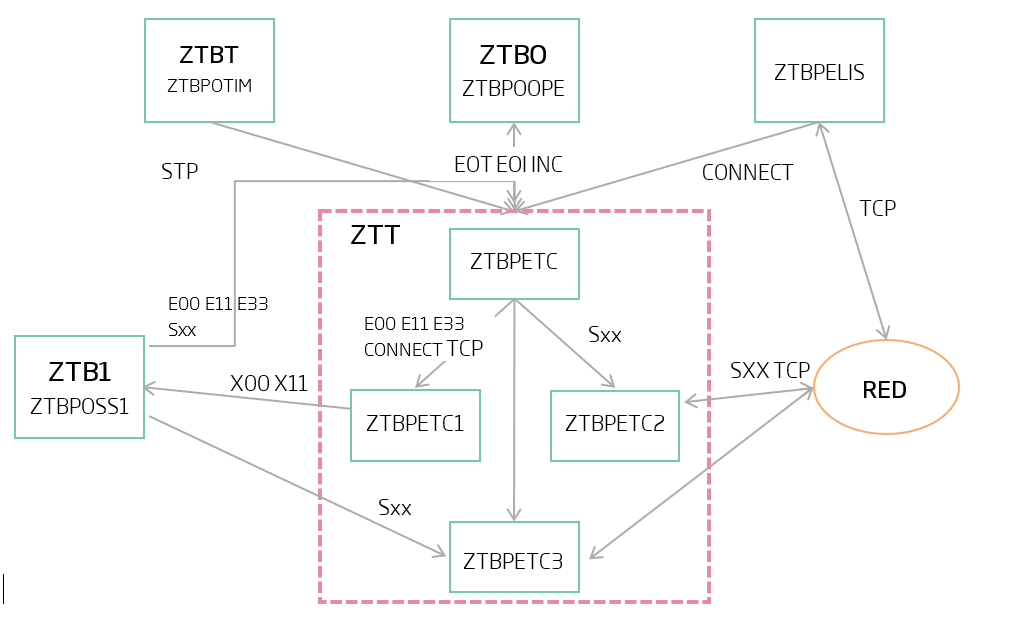
The TCP/IP connection manager developed for Editran aims to provide network access with the least possible impact on the product's current architecture.
The Manager is made up of two processes.
The first process performs the function of permanently listening for connection requests, which we call Listener. It is only responsible for accepting and passing on to the next process the connections made by remote installations that reach it from the network. A Listener listens on a TCP port and on one or more IP addresses.
The second process handles the complete management of the connection and data transmission; it is the Client-Server (CS). It is responsible for managing the connection and data-send requests it receives from Editran, and it processes the data and connection indications received from the remote side. The relationship with Editran is carried out by sending messages between the Editran Core transaction and a transaction assigned to the Client-Server.
Both processes run permanently for as long as the Editran transmission lasts. The listening process remains started while connection indications are to be received. The Client-Server program cannot be unscheduled while it has an active connection. This leads to two BMP processes with no process-time limit that must ‘WAIT’ implicitly (through calls to the ‘socket’ interface) or explicitly (through a macro). The Client-Server could run in an MPP region as long as it is allowed to run indefinitely.
Editran can operate with several Client-Servers and several Listeners. Each CS can receive connection indications from several Listeners, but each Listener will work with a single CS. Even the CS can work without a Listener if it is not going to process remote calls. The number of CSs will adapt to the transmission load of our installation. The assignment of a transmission to a client is made based on the definition of the Editran session profile. In the main Editran environment, several CSs are brought online (up to 6), as an example, which are expanded to the sessions. In each session, the clients that this transmission can use are specified, altering the order or adding new ones. The application will attempt the connection through each of them, backing up in the list if it fails. In the case of incoming calls, the client to be used will be the one assigned to the Listener, but this client must be in the list assigned for that session. This functionality allows load balancing and alternative connection lines.
---
# Agent Instructions
This documentation is published with GitBook. GitBook is the documentation platform designed so that both humans and AI agents can read, navigate, and reason over technical content effectively. Learn more at gitbook.com.
## Querying This Documentation
If you need additional information that is not directly available in this page, you can query the documentation dynamically by asking a question.
Perform an HTTP GET request on the current page URL with the `ask` query parameter, and the optional `goal` query parameter:
```
GET https://docs.editran.onesait.com/documentacion-editran/ibm-editran-v5.3-ims-en/tcp-ims-documentacion-tecnica/descripcion-de-la-implantacion-tcp-ip.md?ask=&goal=
```
`ask` is the immediate question: it should be specific, self-contained, and written in natural language.
`goal` is optional and describes the broader end goal you are ultimately trying to accomplish on behalf of the user. GitBook uses it to tailor the answer towards what is most useful for that goal.
The response will contain a direct answer to the question and relevant excerpts and sources from the documentation.
Use this mechanism when the answer is not explicitly present in the current page, you need clarification or additional context, or you want to retrieve related documentation sections.