> For the complete documentation index, see [llms.txt](https://docs.editran.onesait.com/llms.txt). Markdown versions of documentation pages are available by appending `.md` to page URLs; this page is available as [Markdown](https://docs.editran.onesait.com/documentacion-editran/ibm-editran-v5.3-comun-z-os-en/proxy/introduccion.md).
# Introduction
Editran/PX is a software utility that is implemented together with Editran/TCP, and serves to provide the latter with greater security and control.
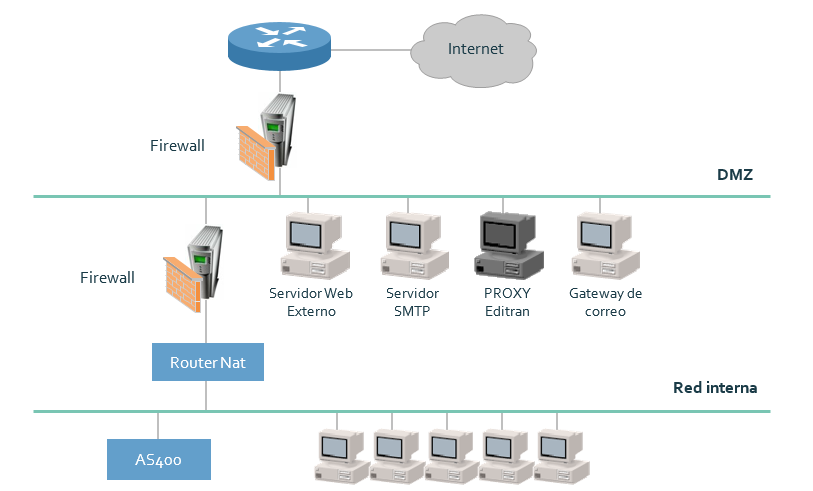
In the following diagram, a basic design of IP connections in the application is presented, with access controlled by 2 firewalls, usually of different technology. However, in said diagram there appear "two different operating situations" (both with Editran running under TCP/IP in the teleprocessing monitor):
* That all data, including connections, take the "normal" path, that is, in both directions the path would be: Editran-Router-Firewall-Firewall-IP network-remote. This would be the normal situation with Editran/TCP.
* That all data, including connections, take in both directions the path Editran-Router – Firewall – Editran/PX – Firewall - IP network - remote. This would be the situation with Editran/TCP including Editran/PX (software running on Editran Proxy). Editran Proxy is a Windows, UNIX or Linux machine located in the entity's DMZ.
In the first situation, when working without Editran/PX, a series of drawbacks arise:
* The host is not isolated from the outside. In some way, it is "seen directly" from the final endpoints.
* The firewall-routers must be managed constantly. When a remote entity gives us its IP address, we normally must enable it. When that entity changes IP, we must "refresh" it. The same happens with remote ports (in case they are controlled). In turn, when internal IPs change, those changes need to be "refreshed". All this maintenance situation is complicated by the widespread use of NAT.
In the second situation, when working with Editran/PX, the previous uncertainties are resolved:
* The host is isolated from the outside. Its only possible connection and data transmission is relegated to the exchange of data in both directions between Editran-router-firewall-Editran Proxy. For that data to reach the remote entity or be received from the remote entity, a second path Server-proxy-firewall-IP network-remote is enabled. This is not a double data transmission, as will be explained later.
* Maintenance and administration of the firewall-router are minimal. The final endpoints are provided with the IP and listening port of Editran Proxy, so they only know that IP. This allows the entire external network to be "enabled" so that only the proxy can be accessed. Editran/PX will only enable a connection with the host when it is sure that an Editran is at the final endpoint.
The characteristics and elements of the product working with Editran/PX are as follows:
* Editran/PX is software that runs in the DMZ, specifically on Editran Proxy (there is also software that runs in the teleprocessing monitor). It is not a second intermediate Editran. It is software that acts as a controller and as a data gateway.
* Editran/PX requires Editran/TCP on the host. It is contracted separately from the latter and is ultimately software-hardware that adds security to transmissions. In this sense, if an external call reaches Editran/PX (remote EDI or non-EDI end), it must also receive some application user data in a recognized format. If they do not arrive or are not recognized, Editran/PX closes the socket that was opened from outside, without the Editran in the teleprocessing monitor "noticing or suffering anything".
The characteristics of the transmission with Editran/PX are:
* The host Editran (also z/OS) communicates through TCP/IP with Editran/PX software, which runs on WINDOWS machines (2003, XP, 7...), UNIX (SOLARIS, AIX, HP) and Linux.
* Editran/PX communicates with the final endpoints in a connection different from the previous one, but in the same data transmission (not in a second transmission).
* In outgoing calls from the teleprocessing monitor, it provides Editran/PX with the TCP/IP information needed to connect to the remote endpoint (IP address and destination port). Editran/PX keeps the host socket open and connects a second socket with the remote endpoint. From that moment on, it begins routing data from one socket to the other.
* In incoming calls to the teleprocessing monitor, the final endpoints call the IP address and port enabled in Editran/PX (through a socket), and send it some application user data. If Editran/PX recognizes their format, it opens a second socket with the teleprocessing monitor (IP address and application port), passes it the user data and the remote IP and port information. From that moment on, it begins routing data from one socket to the other.
* Editran/PX, if it detects TCP/IP errors, provides the diagnosis elements (*errno* and *retcode*) to the teleprocessing monitor to inform it.
* Using Editran/TCP + Editran/PX locally, remote endpoints can have any of the following configurations:
* Editran/TCP
* Editran/TCP + Editran/PX
* There can be up to 999 Editran/PX in the DMZ; for this, up to 999 Proxy Server IP addresses will be indicated in Editran/P of z/OS. In this way, backup can be achieved in case of an outgoing call (for example, if one of the Proxy servers is down), or load balancing (by assigning some sessions to one proxy as first proxy, others to another, etc., or indicating to a group 1 of remotes to call Proxy server 1, to a group 2 to call Proxy server 2, etc.
* Requires remote Editran version greater than 4.0 (both endpoints must have at least Editran 4.1).
---
# Agent Instructions
This documentation is published with GitBook. GitBook is the documentation platform designed so that both humans and AI agents can read, navigate, and reason over technical content effectively. Learn more at gitbook.com.
## Querying This Documentation
If you need additional information that is not directly available in this page, you can query the documentation dynamically by asking a question.
Perform an HTTP GET request on the current page URL with the `ask` query parameter, and the optional `goal` query parameter:
```
GET https://docs.editran.onesait.com/documentacion-editran/ibm-editran-v5.3-comun-z-os-en/proxy/introduccion.md?ask=&goal=
```
`ask` is the immediate question: it should be specific, self-contained, and written in natural language.
`goal` is optional and describes the broader end goal you are ultimately trying to accomplish on behalf of the user. GitBook uses it to tailor the answer towards what is most useful for that goal.
The response will contain a direct answer to the question and relevant excerpts and sources from the documentation.
Use this mechanism when the answer is not explicitly present in the current page, you need clarification or additional context, or you want to retrieve related documentation sections.
.png?alt=media)