> For the complete documentation index, see [llms.txt](https://docs.editran.onesait.com/llms.txt). Markdown versions of documentation pages are available by appending `.md` to page URLs; this page is available as [Markdown](https://docs.editran.onesait.com/documentacion-editran/ibm-editran-v5.3-cics-en/installation/security-system.md).
# Security system
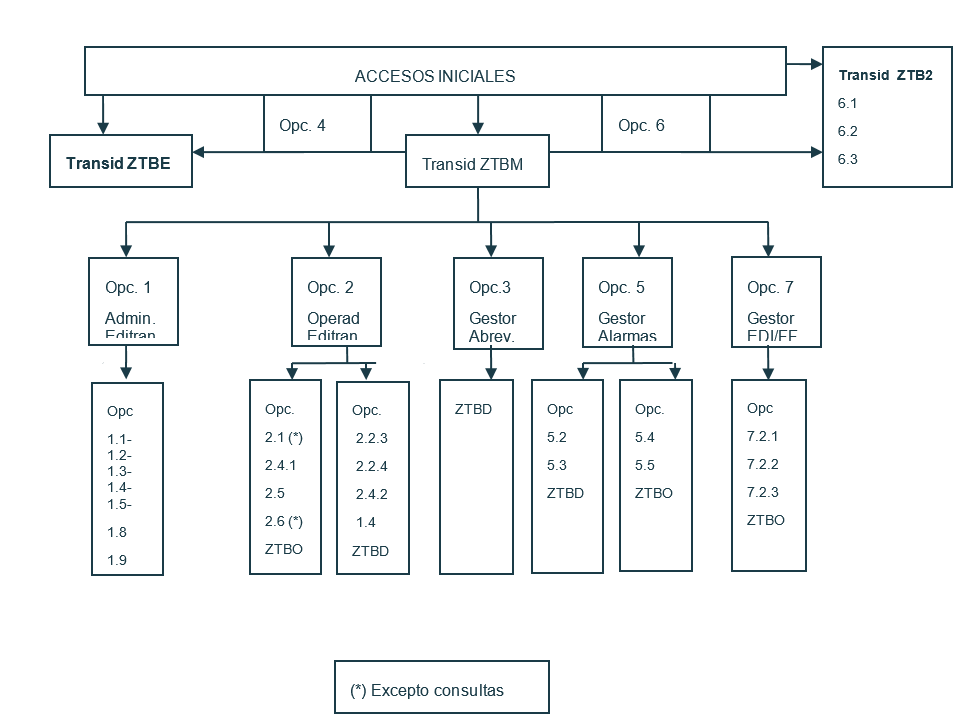
A diagram of the editran/P transaction chain is included, with specification of the associated programs and the files accessed, to serve as a reference for establishing different security levels, whatever product is used for this purpose.
* The transids that handle listener processes (ZTBA) or the general time-out one (ZTBT) must be permanently started. The transid that executes ZTBB or ZTB0 data may have a long duration, depending on the data burst.
* If you wish to use the security system provided by CICS (valid only for versions lower than CICS V-3), the following parameters should be added:
* RSLC=YES in the General Menu transaction (ZTBM).
* RSL=nn in transactions ZTBO, ZTBD, ZTBE, ZTB2 (or those coded in their place in the profiles), where nn is the security code assigned to each of them and they will be related to the different users specified in the SNT Table. The controls performed are:
* The ZTBO transid is for operators:
* Transmission operator, in main menu option 2.6, in all suboptions (2-4), except in inquiry.
* Presentation operator, in main menu option 2.1, in all suboptions (1-9), except in inquiry.
* editran/G status modification operator, in options 2.2.3 and 2.2.4.
* File queues operator, in option 2.4.1.
* Alarm control and management operator. Main menu options 5.4 and 5.5 (enable and disable).
* The ZTBD transid is for administrators:
* editran administrator, in main menu options 1.1, 1.2, 1.3 and 1.4, except in inquiry.
* File queues administrator, in option 2.4.2.
* Abbreviated editran administrator, in main menu option 3.
* Alarm control and management administrator. Main menu options 5.2 and 5.3 (environment and session).
* Exchange key management administrator. Main menu option 6 (except in inquiry suboptions).
* FF management administrator. Main menu option 7.2 (except in inquiry suboptions).
* The ZTBE transid is for statistics (option 4 of the main menu)
* The ZTB2 transid is for Key Management (option 6 of the main menu). Note: this option also has the administration controls.
* RSL=PUBLIC for the rest of the resources (programs, transactions, files, etc.).
* If you wish to use a security product external to CICS (e.g. RACF, TOP-SECRET, etc.), the following parameters should be added:
* SEC=YES and XPCT=YES in the SIT table.
* RESSEC(YES) in transaction ZTBM, within the corresponding CSD.
* Define the PROFILES in the security product, taking into account that, with the above parameters, all editran/P options would be restricted for all users. Therefore, permissions will have to be granted to the corresponding users so they can use the options (transactions) they want.
---
# Agent Instructions
This documentation is published with GitBook. GitBook is the documentation platform designed so that both humans and AI agents can read, navigate, and reason over technical content effectively. Learn more at gitbook.com.
## Querying This Documentation
If you need additional information that is not directly available in this page, you can query the documentation dynamically by asking a question.
Perform an HTTP GET request on the current page URL with the `ask` query parameter, and the optional `goal` query parameter:
```
GET https://docs.editran.onesait.com/documentacion-editran/ibm-editran-v5.3-cics-en/installation/security-system.md?ask=&goal=
```
`ask` is the immediate question: it should be specific, self-contained, and written in natural language.
`goal` is optional and describes the broader end goal you are ultimately trying to accomplish on behalf of the user. GitBook uses it to tailor the answer towards what is most useful for that goal.
The response will contain a direct answer to the question and relevant excerpts and sources from the documentation.
Use this mechanism when the answer is not explicitly present in the current page, you need clarification or additional context, or you want to retrieve related documentation sections.